

Overview
This article will show you a list of the best APKs to watch Boxing for free.
We understand how difficult it is to find a live streaming app for Live sporting events, particularly when it comes to boxing.

Because the Live TV category is so broad, the majority of popular APKs just stream the most popular channels, and others don’t even include Sports content.
And while some live TV APKs include sports content, they only offer a limited range of sports that you can freely stream on your device. Thankfully, Live TV APKs have begun to up their game and provide Live Sporting Events to appeal to sports enthusiasts, particularly cord-cutters who want to watch live sporting events for free.
And, at Reviewvpn, we make every effort to provide you with viable options for your streaming needs, particularly with your Firestick devices. So, let’s get started with the list to see which of these APKs is your top choice and best for watching Boxing for free.

Best APKs to Watch Boxing for Free
The best APKs for watching Boxing events on your Firestick for free are listed below. And because they are all sideloaded applications, you must first jailbreak your Firestick and install the Downloader app. You may simply follow the steps outlined below:
Live NetTV
Live NetTV is one of the most popular live TV applications since it offers over 800 live TV channels that you can watch for free at any time and from any location. And the best part is that it features Live Sports Events, such as live Boxing fights, which you can watch without any charge. Moreover, you won’t even need to register, and you won’t need to subscribe just so you could enjoy the content that Live NetTV offers to its users. And apart from the Live TV content, you can also watch movies and VODs from Pakistan, India, the United States, the United Kingdom, the Arab countries, Turkey, and many other locations.
Features:
- Provides current and upcoming live sports event schedules.
- Request your favorite channels by simply typing the channel’s name into the text box.
- Allows users to report broken channels so that servers can update them.
- Their internal player, as well as external players like MX Player, Android Player, Wuffy Player, and XMTV Player, have built-in compatibility.
- LocalCast, WebVideoCast, and the Bubble UPnP player are all available for casting.
- You can save channels to favorites to make them easier to find in the app.
- Every day, new channels and links are added to guarantee that you have the most up-to-date streaming experience possible.
- To prevent unrestricted access to your account, you can password lock your settings
If your Firestick still has the older interface, read this article to learn how to update it: Update Firestick Interface.
Install Live NetTV on a Firestick with Screenshots
1. Install the Downloader app and jailbreak your firestick by enabling unknown sources. To learn more about the procedure, you may read How to Install the Downloader App and Enable Unknown Sources.
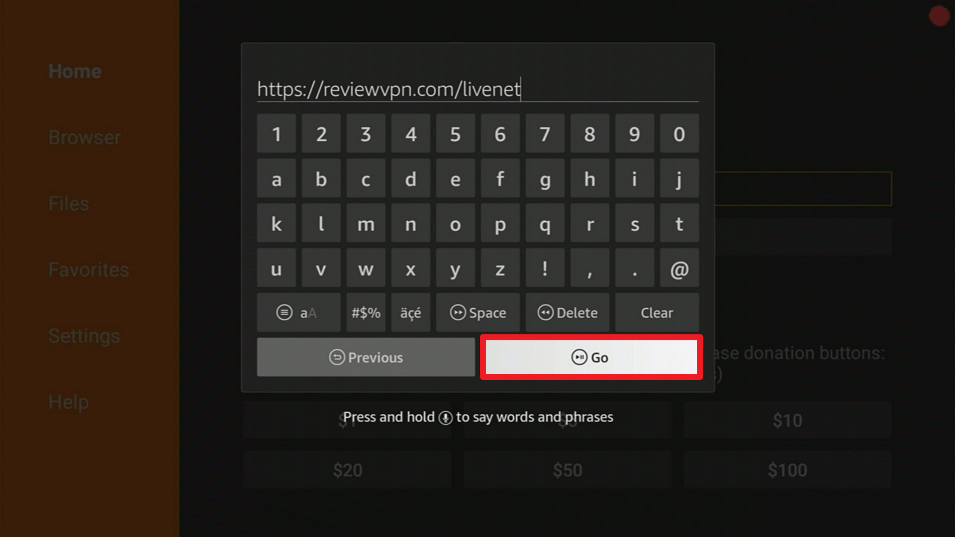
2. Open Downloader App. Type https://reviewvpn.com/livenet and click Go.
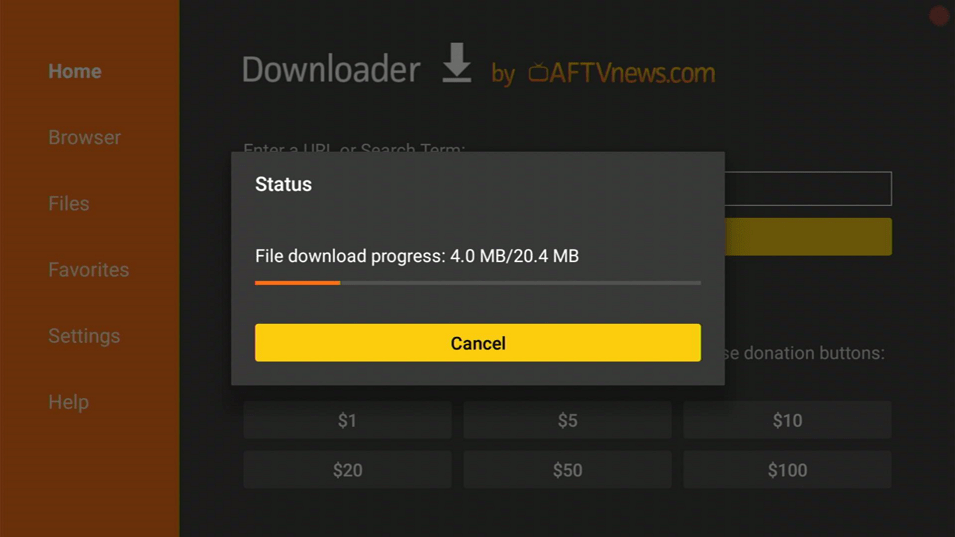
3. Then wait for the APK to download.
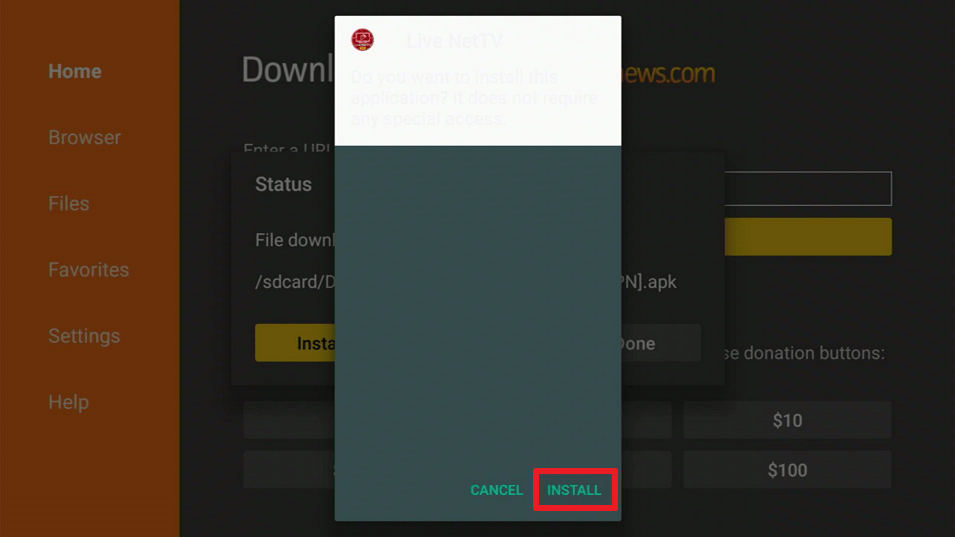
4. Choose “Install”.
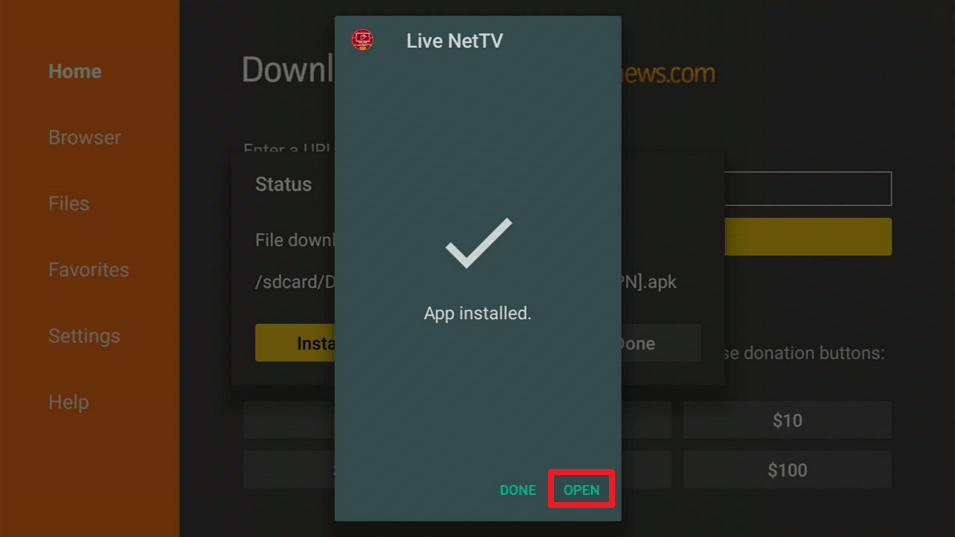
5. Click “Open”.
Live NetTV APK Download for Android Devices

Note: ReviewVPN.com does not host this APK file. It is hosted by Archive.org
You may learn more about Live NetTV by clicking here.
Red Box TV
Because of the thousands of satellite channels available for free streaming, Red Box TV is another popular app for Firestick users. Red Box has a similar interface to Live NetTV, but you can watch Boxing through the Sports section. This includes channels from Box Nation, Box Network, UFC Fight Pass, FOX Sports, Sky Sports, BT Sports, and many others. And the best part about this app is that it can also be used for other sporting events such as the NFL, NBA, WWE, and Golf.
Features:
- Channels can be added to your Favorites list.
- It offers channels for Science, Kids, Indian, Pakistani, South Indian, Arabic, UK, USA, Canada, Australian, Italian, Bangla, Punjabi, Indonesian, Turkish, Portugal TV, Iranian, Sri Lankan, French, German, and Religious, in addition to Sports channels.
- To restrict access to your account, you can set a password for settings.
- You can choose to hide channels from categories you don’t wish to see.
- MX Player, XYZ Player, 321 Player, Android Player, VLC Player, XPlayer, Webcast Player, LocalCast Player, and Bubble Player are some of the video players that can be used.
- Ads can be turned off by sharing some of your device’s resources with long-pressing Brightdata.com.
ReviewVPN cannot attest to the legality, security and privacy of the applications discussed on this site. It is highly recommended that you use a VPN service while streaming or using Kodi. Currently, your IP 216.73.217.24 is visible to everyone and your Browser is being tracked by Advertisers & ISP Provider. Here are the main reasons why you must use a VPN: A VPN works be replacing your ISP-assigned IP address and creating an encrypted tunnel. We recommend the no log service offered by IPVanish. It works well on a Firestick and offers the fastest possible speeds.
YOUR INTERNET ACTIVITY IS BEING WATCHED
Install RedBox TV APK on Firestick with Screenshots
1. Install the Downloader app and jailbreak your firestick by enabling unknown sources. To learn more about the procedure, you may read How to Install the Downloader App and Enable Unknown Sources.
2. Open Downloader App. Type https://reviewvpn.com/red and click Go.

3. Click on INSTALL

4. Click on OPEN

5. RedBox TV is Installed. Enjoy Watching.

Red Box TV APK Download for Android Devices

Note: ReviewVPN.com does not host this APK file. It is hosted by Archive.org
If you want to know more about Red Box TV, you may read this article.
TV Tap Pro
TV Tap Pro is another popular free live TV and sports app that offers over a thousand channels to stream on your Firestick or other devices. You can also watch live boxing fights from Box Nation, BT Sports, ESPN, DAZN, Fox Sports, and many other channels, just like on Red Box TV. And aside from Boxing, TV Tap Pro is a go-to APK for prominent sporting events like Cricket, Darts, Football, Golf, NBA, NFL, NHL, and Rugby, which is one of the reasons why TV Tap Pro has become so popular among Firestick users.
Features:
- There are also channels available for the following categories: Entertainment, movies, music, news, sports, documentaries, children, and food
- You can select or unselect content from Arab, Canada, France, Germany, Italy, Netherlands, Portugal, Spain, United Kingdom, USA, and Others by using the Play/Pause button on your Firestick remote.
- Provides a schedule for Boxing fights and other sporting events that are available on TVTap Pro.
- Channels can be added to your Favorites list.
- Allows you to customize your display settings by selecting whether your Home Screen should show all channels or only your favorites.
- You can choose between English, French, and Italian as your language.
- Ads can be turned off by giving Luminati access to idle resources.
Install the TV Tap on Firestick with Screenshots
1. Install the Downloader app and jailbreak your firestick by enabling unknown sources. To learn more about the procedure, you may read How to Install the Downloader App and Enable Unknown Sources.
2. Open the Downloader App. Type https://reviewvpn.com/tvtap and click Go.

3. Wait for the file download to finish.

4. Click Install.

5. Select Open to launch the app.

6. There you go! You have successfully installed TV Tap.

TV Tap Pro APK Download for Android Devices

Note: ReviewVPN.com does not host this APK file. It is hosted by Archive.org
To know more about TV Tap Pro, you may read it here.
HD Streamz
HD Streamz is another good APK for watching Boxing for free on your Firestick device. It contains a Live Sports section with channels such as Box Nation, BT Sports, ESPN Sports, Fight Box, Fox Sports, and others. Aside from that, you can also select all nations or specific regions, such as the UAE, Qatar, Serbia, the United Kingdom, the United States, France, Portugal, India, Romania, Ireland, the Netherlands, Pakistan, Canada, South Africa, Albania, and Bangladesh. In addition, it has a user-friendly interface that allows you to simply navigate the app and also allows customization to various settings while watching your favorite Boxing fights.
Features:
- Live sporting events, sports, entertainment, music, movies, kids, entertainment, lifestyle, and news are all available for free HD live streaming.
- Cricket, NBA, Golf, NFL, Tennis, and WWE are among the live sports available.
- You can get rid of advertising by sharing the device’s resources.
- You can choose from numerous players such as HD Streamz, MX Player, and X Player depending on the channel you want to watch.
- Allows you to choose between HW, HW+, and SW decoders.
- Amazon Firestick and Fire TV, Android TV Box, NVIDIA Shield, and Mi Box are all compatible.
- On your device, you can change the ff settings as follows: Style, Screen, Controls, Navigation, Text, and Layout
- By just long-pressing on an item, you may add it to your Favorites.
- It offers a search bar that allows you to enter a term directly or sort items by category and country.
Install HD Streamz on Firestick with Screenshots
1. Install the Downloader app and jailbreak your firestick by enabling unknown sources. To learn more about the procedure, you may read How to Install the Downloader App and Enable Unknown Sources.
2. Open Downloader App. Type https://reviewvpn.com/hds and click Go.

3. Click on Install and you should be all set. Remember to delete the APK file after installation to save space.

4. Click Open

5. Click I Agree.

HD Streamz APK Download for Android Devices

Note: ReviewVPN.com does not host this APK file. It is hosted by Archive.org
UK Turks App
UK Turks App is also one of the most dependable APKs for Boxing. BT Sport Box Nation, Sky Sports, ESPN, and Fox Sports are among its Sports TV channels that offer live boxing streaming. And despite having fewer channels than the other apps, the UK Turks App is quite simple to use and browse. It’s not difficult to find these live TV streaming channels, so it’s a good app for those who aren’t particularly tech-savvy. All you have to do is go to the Home screen and select Live TV, then choose Sports TV, and you’ll be able to see all of the TV channels accessible on the UK Turks App. However, because UK Turks App is geo-restricted, you’ll need a VPN to use it if you’re not in the UK.
Features:
- Provides live Sports TV content not only for Boxing, but also for Cricket, Racing, MLB, Golf, MMA, and Tennis
- Its Live TV Sections include Sports TV, Turking TV, PPV Replays, and CCTV
- You can choose from UK Turks Internal Player, MX Player Free Version, MX Player Pro, and VLC Player as your default player.
- You can clear the cache straight from the App’s settings.
- The UK Turks App also includes TV Shows, Cartoons, Concerts, Movies, Documentaries, Standup, Radio, and Favorites, in addition to Live TV (i.e. Live TV Favourites, Tv Shows Episode Favourites, Movies Favourites, etc.)
- You may easily clean up your Favorites list by clearing All Favourites.
Install UK Turks App on a Firestick with Screenshots
1. Install the Downloader app and jailbreak your firestick by enabling unknown sources. To learn more about the procedure, you may read How to Install the Downloader App and Enable Unknown Sources.
2. Open Downloader App. Type https://reviewvpn.com/ukt and click Go.

3. Select INSTALL.

4. Select OPEN.

5. There you go, the UK Turks is installed!

UK Turks App APK Download for Android Devices

Note: ReviewVPN.com does not host this APK file. It is hosted by Archive.org
To find out more about UK Turks App, click here.
Install Surfshark on Firestick
Legal Disclaimer: ReviewVPN.com does not encourage or endorse any illegal activity involved in the usage of services and applications referenced on this site. We do not verify the licensing agreements of services. The end-user is wholly responsible for ensuring that any media accessed through these services does not violate copyright and/or licensing laws. ReviewVPN does not promote, link to, or receive compensation from any Apps and IPTV services.
Stream Safely With a VPN
We can watch live Boxing events on our Firestick devices for free without having to subscribe or pay for anything thanks to Firestick. However, some of these free streaming apps will try to make use of your device’s resources by enticing you to remove ads while watching live Boxing or other sports events.
And even though we don’t know the extent of this data collection, it’s always a good idea to protect and secure your data using the proper online security measure, which is a Virtual Private Network (VPN). A VPN, such as Surfshark, can help you protect your data by giving you an anonymous IP address, allowing you to keep your personal information and data on your device private.
That way, you won’t have to worry about third-party servers or prying eyes gaining access to your data without your permission. It will offer you unbreakable AES-256 military-grade encryption, ensuring that all of your incoming and outgoing traffic is safe and secure.
Here are some of the Surfshark’s additional features to provide you with more information:
- Has a total of 3,200 VPN servers in 65 countries to choose from.
- Connects you to the fastest available connection automatically to ensure you have the best internet speed in your area.
- Get unlimited bandwidth to stream and download everything you want from the internet.
- Enjoy unlimited simultaneous device connections so you can protect all of your devices with the same level of encryption.
- Has a kill switch feature that will automatically disconnect your device from the internet if you disconnect from the VPN by accident
- It prevents hackers and phishers from stealing your data for monetary or malicious threats
- Surfshark adheres to a strong no-logs policy and ensures that no IP addresses are leaked.
How to Install Surfshark VPN on Firestick
If your Firestick still has the older interface, read this article to learn how to update it: Update Firestick Interface.
1. Go to the Home screen of your Firestick.

2. Navigate towards the Find tab. Press the Search button from the resulting dropdown.

3. Type in the keyword of Surfshark and select from the suggestions that will appear.

4. Click the official Surfshark icon from your search results.

5. Press the Download (You own it) button.

6. The Surfshark VPN installer will download on your device.

7. Surfshark VPN’s app will automatically install itself on your Fire TV stick.

8. Press the Open button after completing Surfshark VPN’s installation process.

9. Please wait for the Surfshark VPN to load its user interface.

10. You can now log in with your Surfshark VPN account credentials.

Learn more about Surfshark and Grab the Best Surfshark Deal Now!
Install Surfshark on Firestick



For more VPN discounts, go to ReviewVPN Deals and purchase the best VPN for you.
Click here to get the lowest price on Surfshark through our exclusive limited-time offer.
FAQs
Can I watch the boxing fight on FireStick?
Yes, you can watch boxing fights on Firestick by using the apps listed in this article.
Can you get in trouble for streaming on FireStick?
No, you won’t get in trouble for using a Firestick to stream. However, if you’re not sure whether the app you’re using serves legal content, it’s advised to always use a VPN like Surfshark while streaming to prevent legal problems.
How can I watch free fights on FireStick?
All of the apps mentioned in this article are free. And so, you can use all the apps listed above to watch free fights on your Firestick.
How do I get free sports channels on Firestick?
All you need to do is download and install the apps listed in this article on your Firestick. Then you can start using your Firestick device to get free sports channels.
Is jailbroken Firestick illegal?
No, jailbreaking of Firestick is not illegal. You simply allow installation from sources other than the Amazon Appstore by enabling access from unknown sources. However, illegal apps and content are different matters, which is why we always advise our users to utilize a VPN when streaming, especially if they aren’t sure if an app or content is legal.
Conclusion
Unlike the regular Live TV offering for TV shows, news, and entertainment, finding APKs that offer Live TV for sporting events, particularly boxing, is not easy on Firestick. However, once you find an APK that includes one, you can use this app to watch other sporting events such as the NFL, Golf, MMA, NBA, and others.
And, thankfully, developers are beginning to offer free live sports events to Firestick users, allowing us to enjoy and appreciate our Firestick even more. With that, we’d like to thank you for taking the time to read our article on the best APKs to watch Boxing for free.
We hope we were able to provide you with the best and most user-friendly options so you can begin browsing and streaming your favorite Boxing fights. Enjoy streaming!






