
Overview
Quick Navigation
The Google Chromecast is one of the most popular video-streaming devices.

It can provide a wide range of movies and TV channels to your television. Sadly, many of those TV channels have geographical restrictions, which means you can only access those channels from a specific country. Also, there are live streams that are subject to geo-location that block you from streaming sports as well as other events if they go live within a particular region.
Nonetheless, a Virtual Private Network or VPN can bypass these geographic limitations and let you stream your favorite streaming TV channels from across the globe. A VPN encrypts all the internet traffic of the Google Chromecast and routes it via a server in a remote location of your choice, thus concealing your actual location from the streaming platform.

What Is a Virtual Private Network or VPN?
A Virtual Private Network or VPN provides you privacy & anonymity on the internet by generating a private network that originated from a public web connection. A VPN service hides your internet protocol address or IP so your online activities will be untraceable. Most importantly, a VPN establishes secure & encrypted connections to deliver greater privacy compared to a secured Wi-Fi hotspot.
Chromecast is a great device that digitally projects video content from PC, mobile phone, or tablet to the television. Nonetheless, the streaming platforms available with it, such as Netflix or Hulu, are Geo-restricted in several countries of the world, and in order to access them, you must have a VPN for your Chromecast.
For instance, you can’t stream movies or TV shows on Hulu if you are outside the United States, and BBC iPlayer is inaccessible from outside the United Kingdom – unless you use a reliable, secure Virtual Private Network.
The Best VPN for Google Chromecast
SurfShark
If you’re on a budget, then one of your best options would be SurfShark. Despite only costing $2.49 per month, it allows you to unblock pretty much all geo-restricted platforms and websites from across the globe.
In addition, with more than 3200 servers all over the globe, SurfShark manages to provide fast streaming speeds. It lets you literally stream your most-liked movies & TV shows in Ultra High Definition (UHD) picture quality. For streaming fanatics out there asking – Can I stream Netflix in Spain? Definitely yes, streaming enthusiasts can watch any Netflix content including in Spain with the fast-speed servers of SurfShark.
NordVPN
NordVPN is among the most popular VPN service providers for Google Chromecast in the market. It has the largest network servers compared to other VPN service providers, consisting of over 5500 servers in more than 59 countries. Similar to any VPN service provider, NordVPN utilizes powerful encryption protocols that not only aid users secure their privacy but also help them unblock popular streaming platforms, such as Netflix.
Additionally, the NordVPN privacy policy is flawless, as it ensures strict no data logging. Thus, NordVPN on Google Chromecast offers one of the best experiences when using the streaming device through VPN.
IPVanish
IPVanish is a fast, very easy-to-use, and affordable VPN service provider that incorporates sturdy encryption and guarantees a perfect user experience. With the IPVanish VPN service, your web activity is untraceable. This VPN service has a strict no-logs policy so even its own employees will never know your activities on the internet. It offers an internet kill switch feature. Wherein, your information or data will still be secured even if your internet connection drops.
The VPN’s encryption standards are very tight. It utilizes a SHA512 authentication, 256-bit encryption on the OpenVPN protocol, & a DHE-RSA 2,048-bit key exchange with remarkable forward secrecy. Thus, even if a person’s account is vulnerable, hackers, ISPs, or the government can never decrypt previous session information and launch browsing history.
IPVanish VPN service lets you select between 850 servers across 60 countries. It allows ten devices to connect simultaneously, which makes it an even affordable VPN service provider if you want to share it with your family or friends. The VPN service has applications for both Android and iOS.
IPVanish Features:
- Unblocks Netflix in the United States
- A database of over 40,000 IP addresses
- Split tunneling
- 30-day money-back guarantee
- User-friendly dashboard
- SOCKS5 proxy support
- It is compatible with most computer software
- More than 70+ countries
- PayPal accepted and credit cards
- P2P permitted
- Can connect to 10 different servers simultaneously
- Zero logs policy
- Provides Kill switch feature
- Leak protection
- Superb encryption
- Unlimited bandwidth and data allowance
If you want a VPN service provider that is robust in the United States and Europe but also provides servers in places such as Brazil, Australia, Japan, & South Africa, then IPVanish VPN is the best option.
Other VPN Services for Google Chromecast
ExpressVPN

ExpressVPN is one of the best VPN service providers in the world. It offers more than 3000 servers in about 94 locations. All of its servers are heavily encrypted and provide fast speeds.
Regarding speeds, this VPN provider is one of the fastest VPN services you’ll ever find on the web. However, all the performance ExpressVPN does come at a price. The ExpressVPN for Chromecast will cost you $6.67 a month. That said, the expensive price of ExpressVPN is worth it and makes casting with Virtual Private Network a lot easier.
Features:
- Outstanding connection speeds
- More than 3,000 servers in 90 countries
- 30-day money-back guarantee
- 5 simultaneous device connections
- It functions with Spotify, Sling TV, Disney+, HBO Now, Netflix, and many more
- Compatible with Android, macOS, iOS, Windows, Linux, and many more
CyberGhost
With over 7,400 servers around the world, CyberGhost lets you connect to almost all countries, including Germany, Sweden, France, the United Kingdom, Australia, and the United States. Also, you’ll be amazed by the compatibility of this VPN service with a wide range of Android-powered devices, which include Google Chromecast, Amazon Fire Stick, Android TV, Android smartphone, and tablet.
Features:
- 45-day money-back guarantee
- 7,400 servers in 91 countries
- Also works with Netflix, Amazon Prime Video, BBC iPlayer, Spotify, HBO, and many more
- 7 simultaneous device connections
- Amazing speeds for streaming music
- Compatible with Linux, macOS, Android, iOS, Windows, and lots more
Important VPN features for Chromecast
For you to get the most out of a VPN service for Chromecast, the VPN service must have the following features:
- Provides access to streaming services – The VPN service provider must unblock streaming platforms such as iPlayer, Netflix, Hulu, and many more – so you can watch your favorite videos regardless of where you are.
- Easy to use the app – the VPN service should be an easy-to-use app for Mac, Windows, iOS, and Android. The VPN also works well with VPN-ready routers.
- Must have fast servers – there are Virtual Private Networks that slow down the internet connection, nonetheless, by using a VPN service with super-fast servers, you’ll notice the difference.
- A global server network – allows you to unblock videos from all over the globe. The VPN service must have large networks of servers across the globe.
- Great customer service – the VPN services must have 24/7 live chat support so users can immediately talk to someone if some issues occur.
- It has affordable or cheap plans – Even though VPNs vary in price, there are VPNs for Chromecast listed in this article that provide good value for your money.
- Strong encryption – A VPN service provider is first and foremost a privacy tool and thus it is important that it offers strong encryption. This way, your Internet Service Provider (ISP), the government, and hackers can’t spy on what you’re doing on the web, giving you peace of mind.
How To Set Up Surfshark On Google Chromecast
A VPN is a user-friendly app that functions in the background and does everything for you. An amazing VPN, such as Surfshark, is very fast, you will not even notice it while you’re streaming videos on your Google Chromecast. To get access to geo-restricted content on Chromecast, follow the steps below:
Why do You need a VPN for your Google Chromecast?
A Virtual Private Network or VPN is a handy online tool that lets you gain added privacy & freedom on the web. A VPN functions by encrypting data and allowing web users to hide their IP address – making the person be in a different region or country. When used in combination with Google Chromecast, your streaming device acquires these benefits – ensuring your privacy while streaming on the internet, protecting you from WiFi hackers, and letting you access geo-restricted content from across the globe to cast onto your TV screen.
Due to how consumer VPN services work, a VPN app excludes local IP addresses to allow you to access local resources like LAN drives, Chromecast dongles, and printers. Thus, running a VPN app on the streaming device will not prevent users from casting to Google Chromecast. You need to connect the VPN on the streaming device before you start casting.
Install Surfshark VPN on Google Chromecast with Screenshots
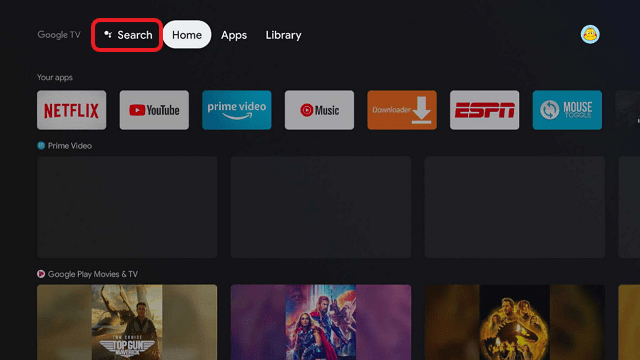
1. Click Home on your remote then select Search.
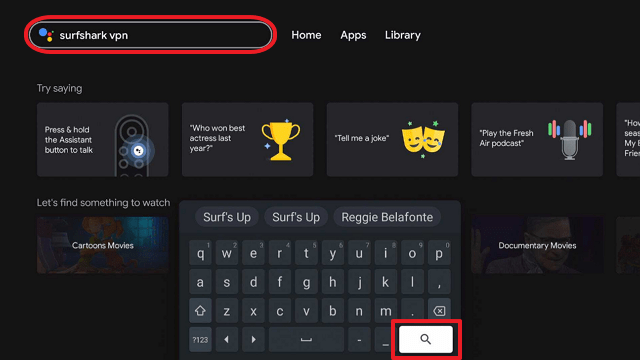
2. On the search bar, you can use google voice assistant to find Surfshark VPN or by typing it.
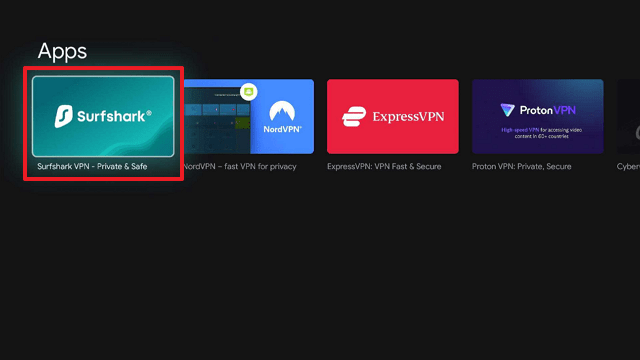
3. Click on Surfshark VPN icon.
4. Click on Install.
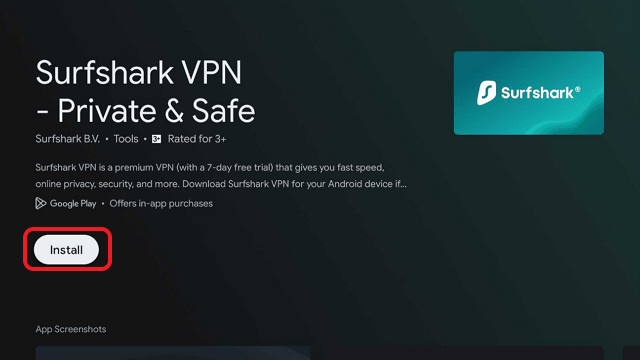
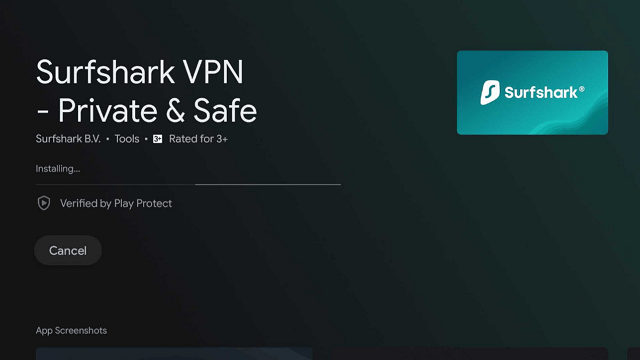
5. Surfshark VPN is now installing just wait for it until it’s done.
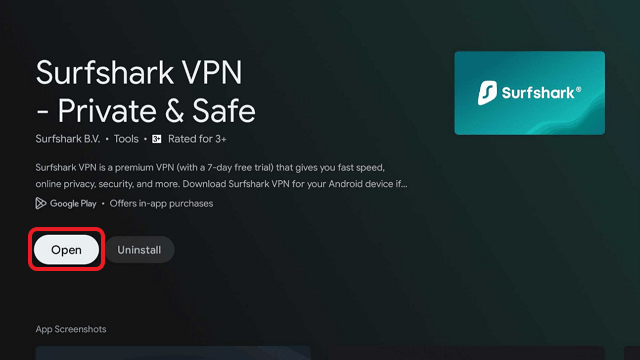
6. Click open.
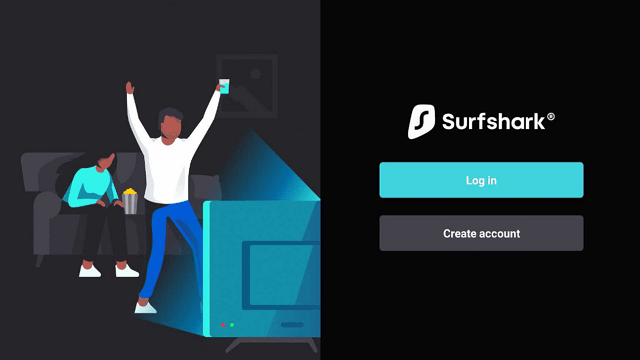
7. Input your username and password to log in
Learn more about Surfshark and Grab the Best Surfshark Deal Now!



For more VPN discounts, go to ReviewVPN Deals and purchase the best VPN for you.
Click here to get the lowest price on Surfshark through our exclusive limited-time offer.
How does a VPN work?
When you connect the Chromecast to a VPN server, your true IP address is masked and the websites and streaming platforms you visit will indicate that you’re positioned in the remote location where the server of the VPN you’re linking to is located. For instance, if you live in the United States but connect to a VPN server in the United Kingdom, you actually seem to live in the U.K. and you can use streaming platforms to stream videos from there that are usually geographically restricted.
If you utilize a VPN app, it is not important where you actually live. A VPN lets you instantly connect to a network server in another country and use the web as if you were actually residing in that place. Wherein, you’ll be given the freedom to access a nearly endless list of entertainment content with your Google Chromecast.
FAQs
Can I use a VPN app with Google Chromecast?
- Yes, all you have to do is download & install the VPN app on Chromecast or choose a VPN that functions well with your router and is great for streaming movies & TV shows. Then, set the VPN up on the router and you can utilize it on Google Chromecast.
Does Surfshark work with Google Chromecast?
- You can use the Surfshark app with Chromecast by connecting to a virtual or a physical router. The Surfshark app is good for using Chromecast as it provides lots of servers to let you avoid geo-restrictions.
Is it okay to use a free VPN service with Google Chromecast?
- You may use a free VPN service with Google Chromecast. Just make sure that it’s in tune with your router. Nonetheless, it is not recommended to use a free VPN service, as they are not as reliable, secure and are more likely can’t unblock streaming services.
In any case, nearly all free VPN services require you to use their applications and you can’t manually configure the connections. Thus, router setup is not an option. Also, free VPN services implement bandwidth restrictions & data caps that can suspend whatever you are doing on the internet.
Conclusion
Google Chromecast is one of the most popular videos streaming devices. If the content has geo-restrictions, you can bypass the block by using a VPN service. The best VPN service provider for Google Chromecast is the Surfshark VPN service.






