

Gaither TV App On Firestick
Quick Navigation
This article aims to provide you with information about the Gaither TV app and helps you with how to install it on your Firestick.

What is the Gaither TV App?
Are you fond of homecoming programs but don’t know where to stream? Well, here is the latest Gaither TV app that lets you gain 24/7 access to homecoming programs. Gaither TV offers subscriber-only content such as video singles, exclusive concert footage, interviews, special presentations, and more. It also allows you to listen to music from the Homecoming family and Gaither Music Group artists.
A flexible and cost-effective internet television that lets you pause, rewind, fast forward or repeat it anytime and watch them later at your convenience. The wait is over with Gaither TV and you will no longer wait days or months for your favorite programs to be released because it lets you stream in advance. Choose from a variety of programs by following just a simple step. One of the amazing Internet Television that you can have on your Firestick. Subscribe now to Gaither TV and Enjoy their homecoming programs of your choice!
How does it Work?
Gaither TV is very simple to use, in your laptop, smartphones, tablet go to the browser and type www.gaither.tv. Sign up and follow a few simple steps to subscribe and complete the process. Then that’s it you can enjoy watching your favorite Homecoming programs anytime and anywhere.

How to Install Gaither TV App on Firestick
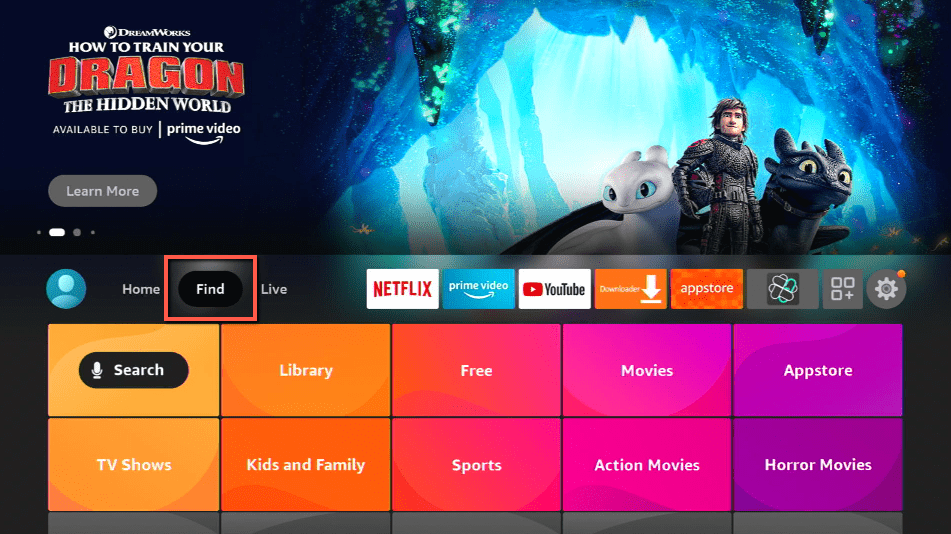
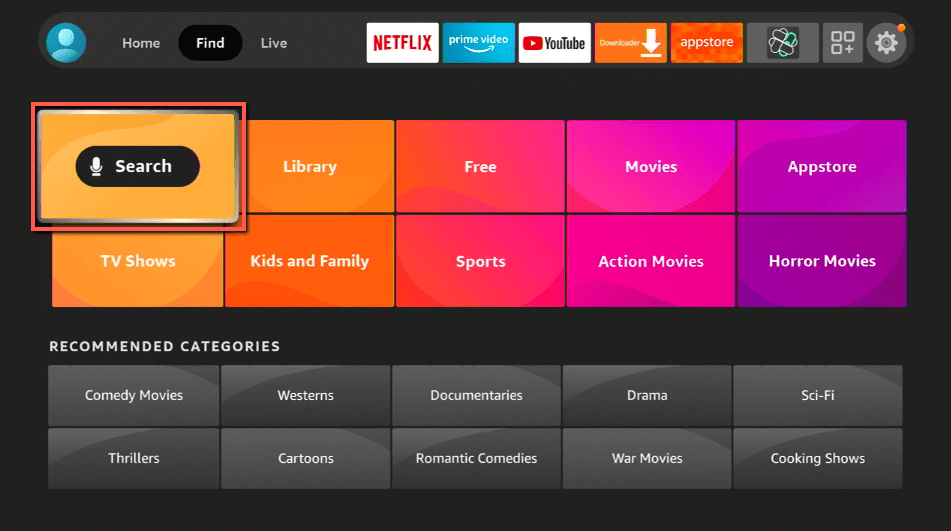
- On your Firestick home screen look for the search button.
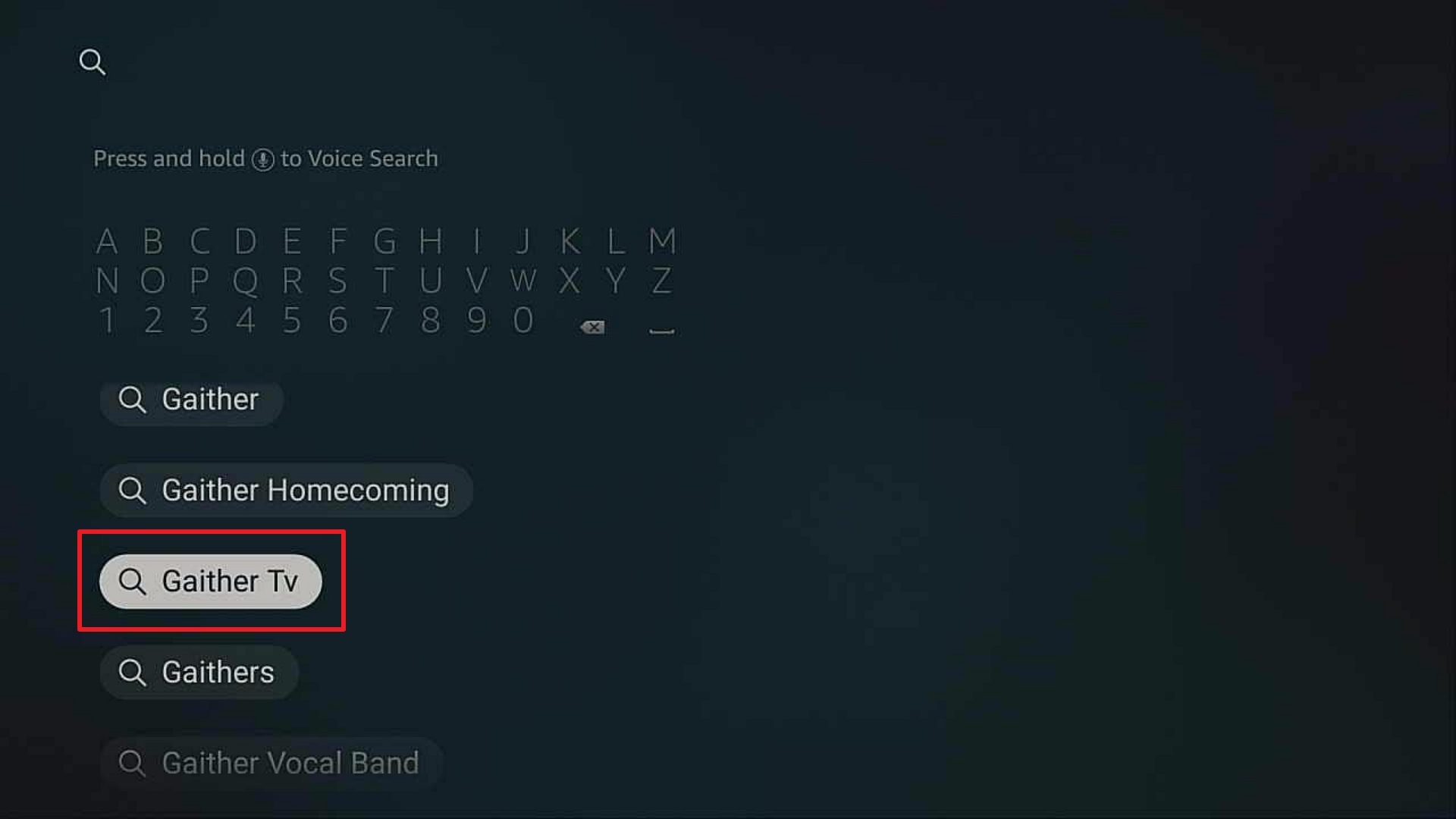
- Type in Gaither TV and click on the suggestion.
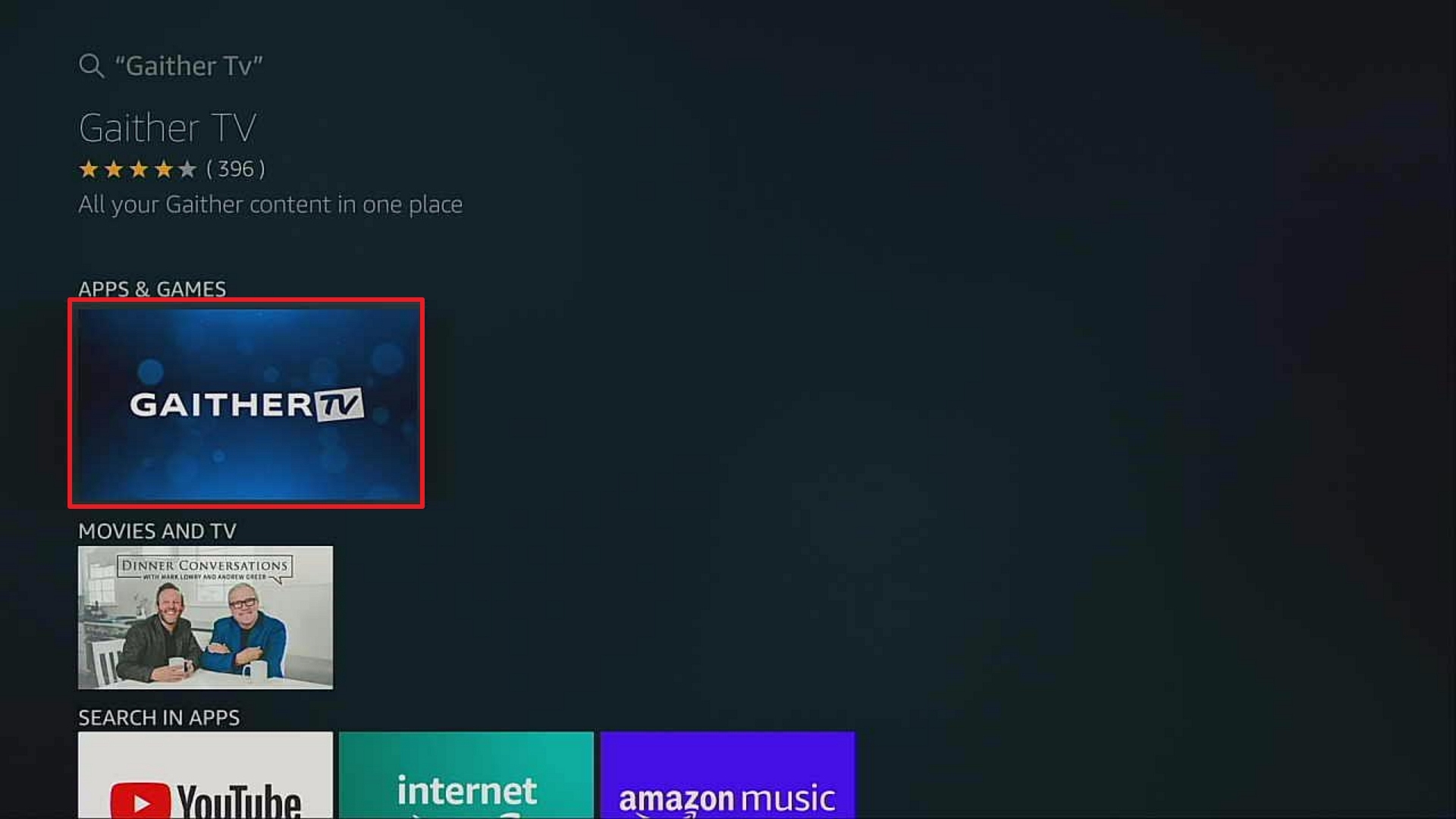
- Click on the icon of Gaither TV.
- Tap the Get or Download button to install the app.
- Wait a few minutes for the app to be installed.
- Select Open to launch the app.
If your Firestick still has the older interface, read this article to learn how to update it: Update Firestick Interface.
How to Install Gaither TV App on Firestick with Screenshots
1. Click FIND.
2. Click Search.
3. Search for the Gaither TV.
4. Select the icon of Gaither TV.
5. Click Download.
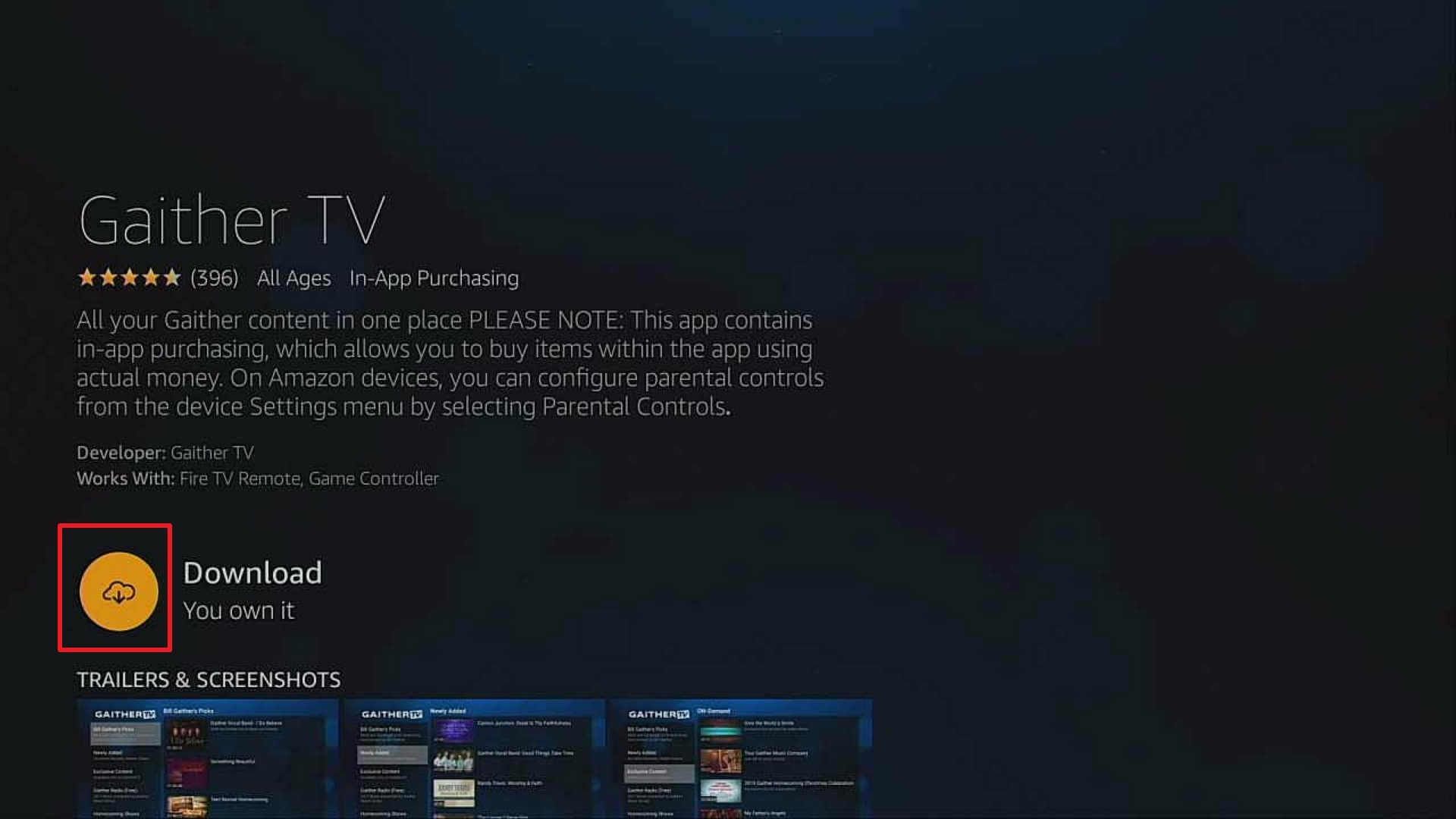
6. Click Open.
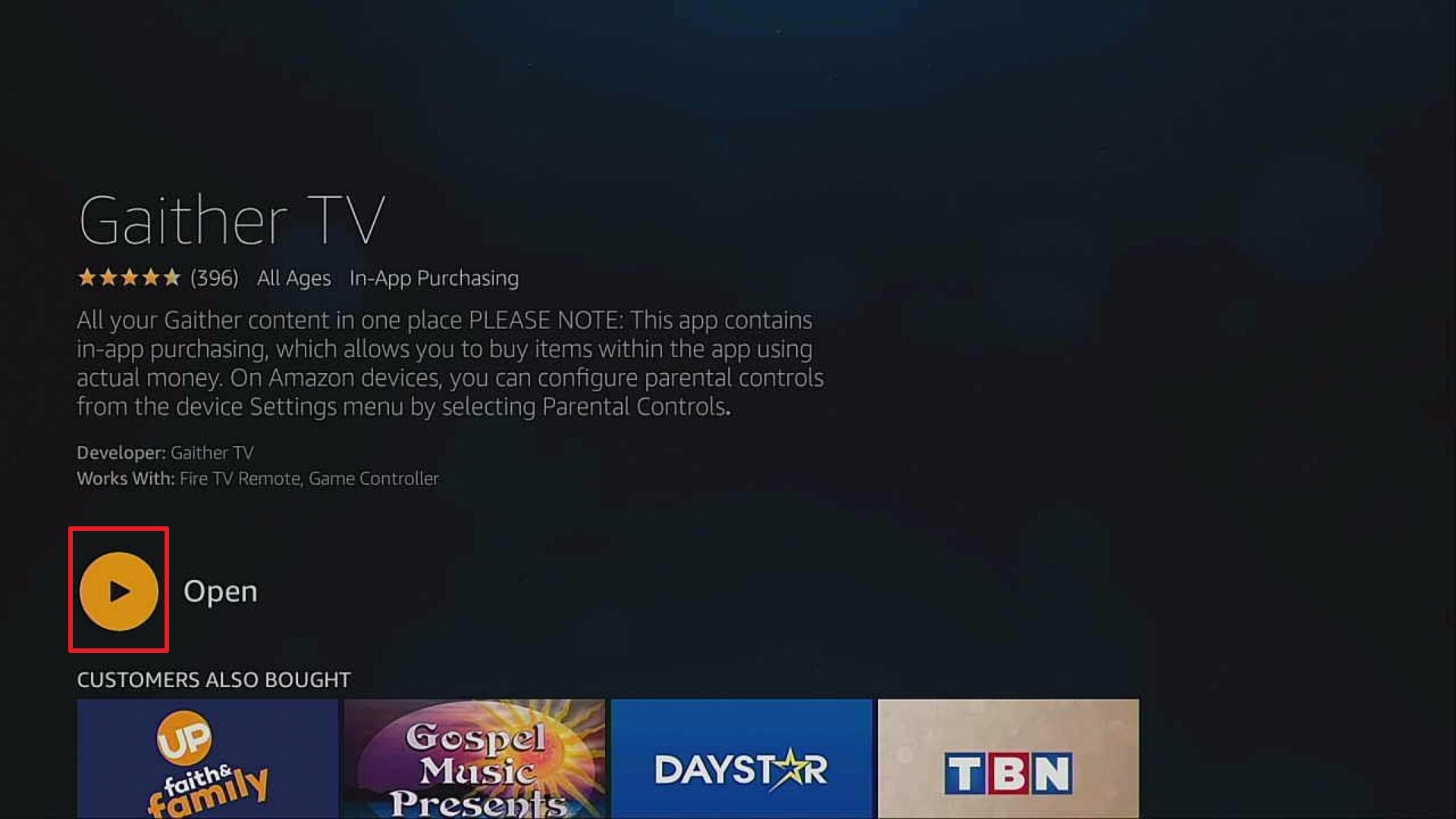
7. Click Browse Content.
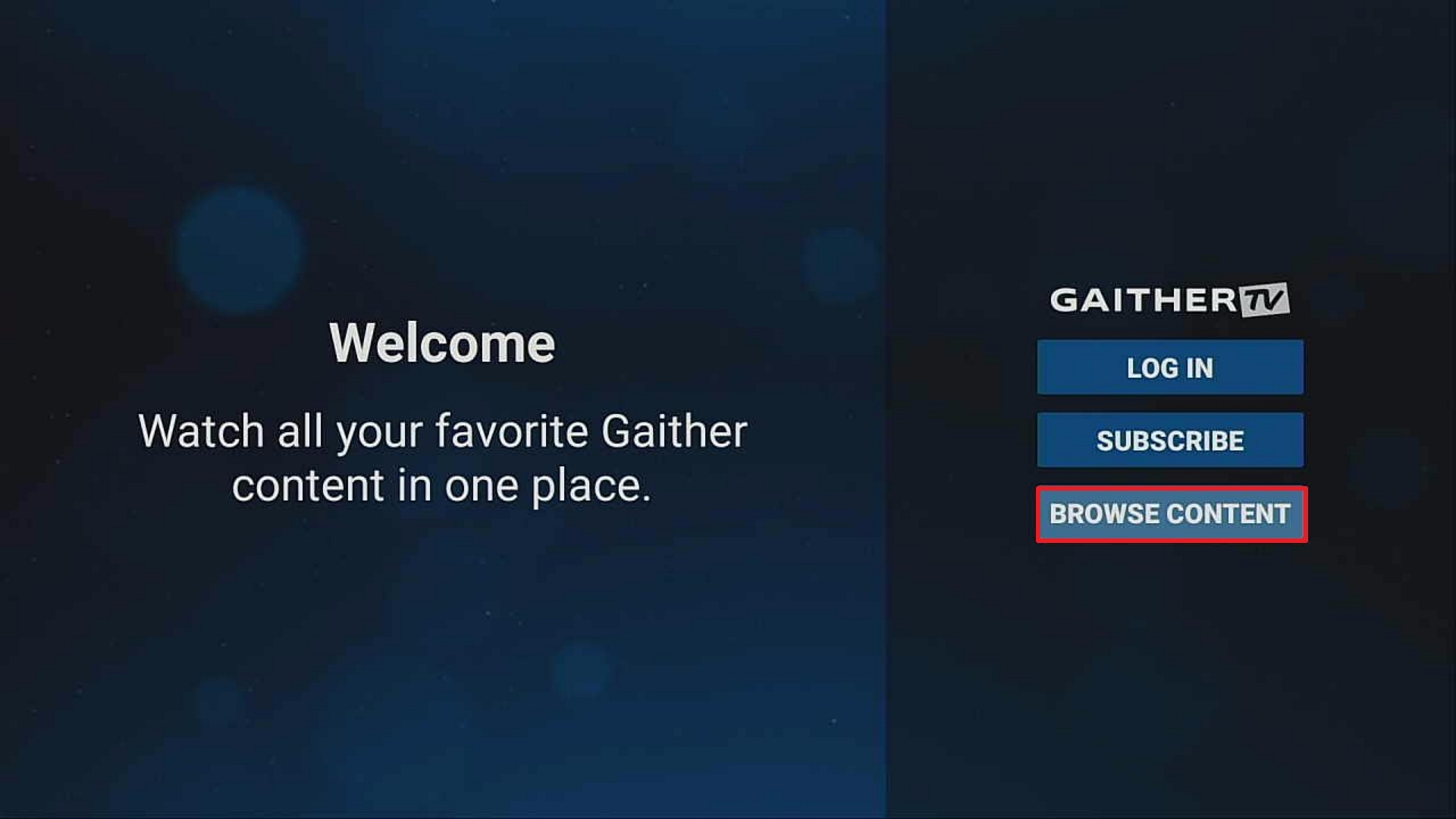
8. Enjoy Watching.

ReviewVPN cannot attest to the legality, security and privacy of the applications discussed on this site. It is highly recommended that you use a VPN service while streaming or using Kodi. Currently, your IP 216.73.216.251 is visible to everyone and your Browser is being tracked by Advertisers & ISP Provider. Here are the main reasons why you must use a VPN: A VPN works be replacing your ISP-assigned IP address and creating an encrypted tunnel. We recommend the no log service offered by IPVanish. It works well on a Firestick and offers the fastest possible speeds.
YOUR INTERNET ACTIVITY IS BEING WATCHED
Legal Disclaimer: ReviewVPN.com does not encourage or endorse any illegal activity involved in the usage of services and applications referenced on this site. We do not verify the licensing agreements of services. The end-user is wholly responsible for ensuring that any media accessed through these services does not violate copyright and/or licensing laws. ReviewVPN does not promote, link to, or receive compensation from any Apps and IPTV services.
Install Surfshark on Firestick

Features of Gaither TV
Gaither TV offers subscriber-only content such as:
- Exclusive Content – Gaither TV brings you exclusive concert footage, interviews, and special presentations and more.
- Bill Gaither picks- Gain Full-Length DVD selections of videos personally chosen by Bill Gaither such as Gospel Pioneer Reunion, Gaither Vocal Band, The Best of Jessy Dixon, and Canton Junction: Great is thy Faithfulness.
- Homecoming Singles – Enjoy a 24/7 streaming with a variety of video singles featuring your homecoming friends and Bill Gaither’s favorite music group artists.
- Early Premieres – No need to wait for the releasing date of your favorite television program because this TV lets you view them first before they release.
- Personal Selection – Customized your library and handpick shows from your favorite Homecoming artist.
- Gaither Radio – this also lets you listen 24/7 from the Gaither Music Group.
Gaither TV Subscription
Subscribe to Gaither TV and welcome your homecoming friends in your house 24/7 with unlimited Homecoming programs to stream and at the same time gain access to their very best gospel music from Gaither Music group artists. Sign-Up for only $4.99 monthly subscriptions and they also offer an annual subscription for $49.99 only. Each plan starts with a Free Limited-time 7-day trial. You can also cancel it anytime you want because there is no contract or commitment.
Compatible Platforms
Gaither TV works well with the Amazon Firestick, Apple TV, Roku, Google TV, Android Devices, and iOS Devices. You can get this app on the Amazon store, Apple Store, and Google Play store for free.
Pros and Cons
Pros
- High Definition Videos
- Multiple Device Connections
- No annual contract
- 24/7 access
Cons
- Always required new sign in
- Subtitles Function problem
FAQs
History
Gaither TV is founded by Gloria and Bill Gaither and the date it was first available was on May 15, 2020.
Is this app safe to download?
Yes, it is safe to download and install on your device.
Is this app legal?
It is 100% safe to download and use.
Is it free?
Gaither TV is free to download but you still need to subscribe to enjoy the full service of this app.
Where could I get this app?
Gaither TV is available on Amazon App Store, Google Play Store, and Apple Store.
Is there an official website?
Gaither TV official website is https://www.gaither.tv/webtv-v3/
Alternative App for Gaither TV
Here are some of the TV streaming app on Firestick
- Live NetTV
- TVTap
- Mobdro
- Swift Streamz
- Red Sox TV
- YouTube TV
Stream Fast and Safe with Surfshark

If you want to enjoy streaming with a high-speed connection and at the same time keep your personal information private, you need a VPN.
Surfshark is one of the most recommended VPNs that has a lot of impressive features including:
- Geo-Blocking lets you bypass Bypass Censorship so that you can stream anywhere without restrictions.
- Protect all your personal information whenever you are using Public Wifi.
- Stop ISPs from interfering with your connection.
- Unlimited Bandwidth so that you can stream as much as you can.
- Fast streaming with high-speed connections
Surfshark is a good Firesticks VPN that helps you to stream safely and smoothly.
Note: For more information about Surfshark, please read our Surfshark Review.
Install Surfshark on Firestick
How to Install Surfshark VPN on Firestick
If your Firestick still has the older interface, read this article to learn how to update it: Update Firestick Interface.
Follow our screenshots below to install the SurfShark VPN app on your Fire TV stick.
1. Go to the Home screen of your Firestick.

2. Navigate towards the Find tab. Press the Search button from the resulting dropdown.

3. Type in the keyword of SurfShark and select from the suggestions that will appear.

4. Click the official SurfShark icon from your search results.

5. Press the Download (You own it) button.

6. The SurfShark VPN installer will download on your device.

7. SurfShark VPN’s app will automatically install itself on your Fire TV stick.

8. Press the Open button after completing SurfShark VPN’s installation process.

9. Please wait for the SurfShark VPN to load its user interface.

10. You can now log in with your SurfShark VPN account credentials.

Learn more about Surfshark and Grab the Best Surfshark Deal Now!
Install Surfshark on Firestick



For more VPN discounts, go to ReviewVPN Deals and purchase the best VPN for you.
Click here to get the lowest price on Surfshark through our exclusive limited-time offer.
Conclusion
Gaither TV is good for soul-searching because it offers you varieties of Gospel songs and is good for homecoming celebrations. This app is very convenient to use and lets you stream anywhere and anytime at your convenience.
Final Thoughts
We hope this article answers all your questions about Gaither TV and helps you with how to install it on a Firestick. Thank you for reading!






