How to Watch Local Channels and Live TV on Your Firestick

Article Overview

This article aims to provide information on how to watch local channels and live tv on Firestick.

For cord-cutters out there, it is so much easier now to watch live tv and local channels on Firestick. A lot of legal apps are now available to install on your device. Whether you are looking for News, Talk Shows, or even Sports, we’ve got you covered.

We have listed the best local channels and the best live tv application in the following articles. Take your time to know more about every one of them. The best part of this is that almost all of these apps are free.

Best Local Channels on Firestick

Best Live TV Apps on  Firestick


But before we start, you need to know that some apps require you to be in a certain country or region for you to access their content. You can do it even without going to that country by using a VPN. The best VPN that we can suggest to you is Surfshark. We will discuss more this VPN later in this article.

Since we are going to feature the best legal live tv and local channels apps in this article, you can directly install them. All you just need to do is search for them and click the install button. There is no need for you to Jailbreak your Firestick and Install the Downloader app.


If your Firestick still has the older interface, read this article to learn how to update it: Update Firestick Interface.


ANONYMOUSLY


How to Watch Local Channels and Live TV on Firestick

Here is the list of the best live tv and some local channels on Firestick:


CBS All Access

Local Channels and Live TV

Columbia Broadcasting System or CBS is a tv and radio commercial station based in New York City. It offers original content for live tv and shows as well. The station owns and operates about 240 radio stations throughout the United States.

But the app is only available on firestick if you are in America along with CBS Sports App. However, you can install CBS News App wherever you are located in the globe.

CBS is one of the most popular and the best live tv and local channel app to be available on Firestick. To know more about this app, and to install it on your Firestick, read How to Install CBS Channel App on Firestick.


Haystack News

One of the best free apps for world news and live TV is Haystack News. It is an official Amazon app that you can easily install on your Firestick and Android devices.

The app offers about 300 channels with a lot of genres like weather, current events, sci-tech, politics, international, entertainment, business, and many more.

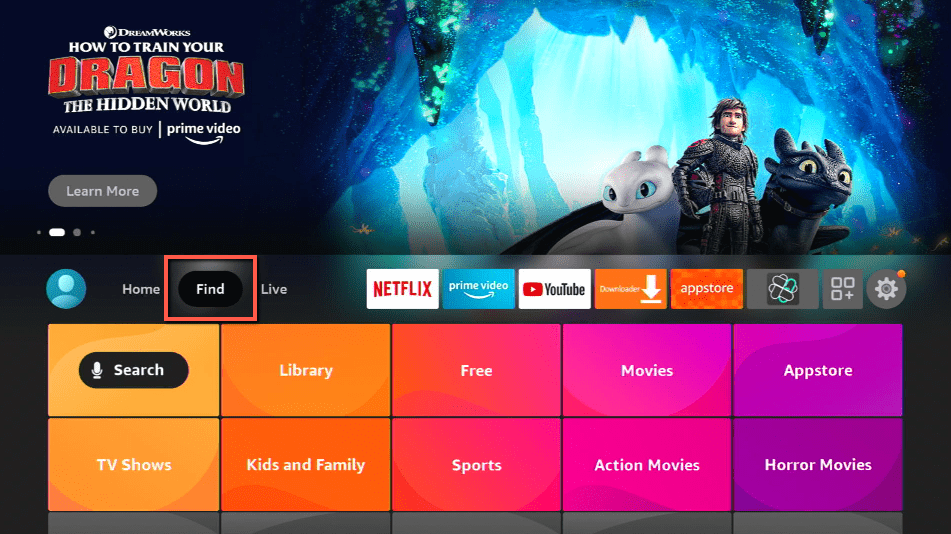
To install it on Firestick, all you need to is

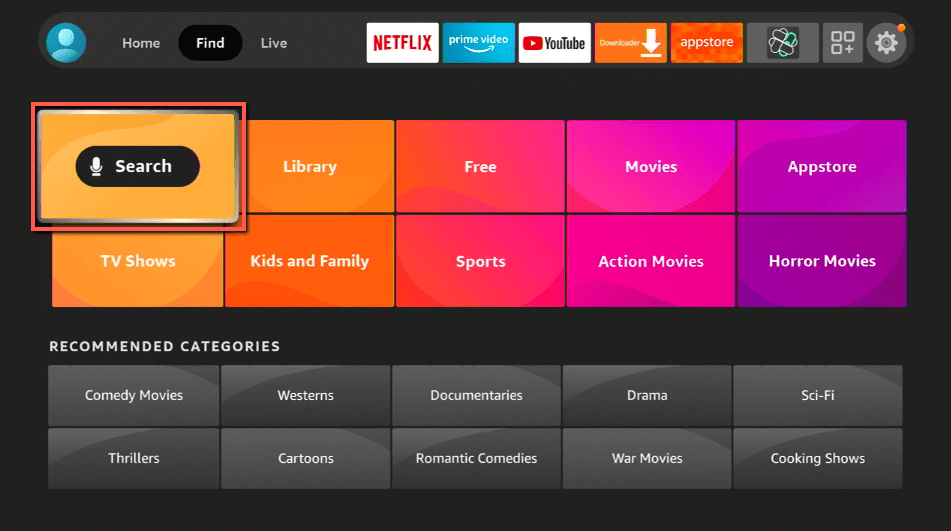
1.   Click FIND.
Local Channels and Live TV

2. Click Search.

Local Channels and Live TV


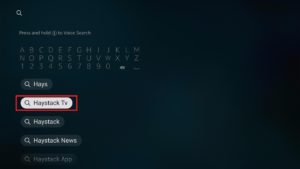
3. Type Haystack News and click on the suggestion
Local Channels and Live TV


4. Tap the icon of the Haystack News when it appears
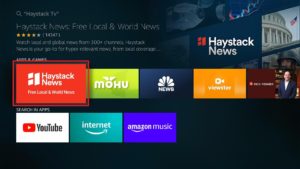
Local Channels and Live TV


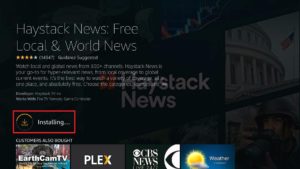
5. Click the Get or Download button to install the app
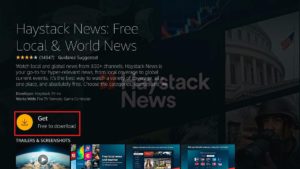
Local Channels and Live TV


6. Wait for the app to be installed

Local Channels and Live TV


7. Select Open to launch the app

Local Channels and Live TV


8. Choose if you would like to Get Started immediately or Sign In for free
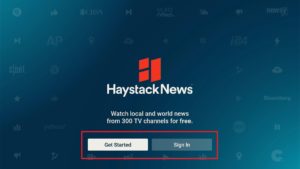
Local Channels and Live TV


To know more about the app, go to How to Install Haystack News on Firestick and Android.


Tubi TV

tubi tv logo

Surprisingly, Tubi TV isn’t about free movies and tv anymore. It started to grow its business by making live TV available also.

Although it is also not available outside the USA, you can still install the app on your Firestick by reading these articles:

How to Watch Tubi TV Abroad

Watch Tubi TV for Free Movies and TV Shows

Install Tubi TV on Firestick and Android

Tubi TV Kodi Addon

Now, Tubi TV provides local news channels along with popular names like NBC News, CBS, and Euronews.

  • Atlanta (WAGA-TV)
  • Austin (KTBC-TV)
  • Chicago (WFLD-TV)
  • Dallas (KDFW-TV)
  • Detroit (WJBK-TV)
  • Houston (KRIV-TV)
  • Los Angeles (KTTV-TV)
  • Milwaukee (WITI-TV)
  • Minneapolis (KMSP-TV)
  • New York (WNYW-TV)
  • Orlando (WOFL-TV)
  • Philadelphia (WTXF-TV)
  • Phoenix (KSAZ-TV)
  • San Francisco (KTVU-TV)
  • Seattle (KCPQ-TV)
  • Tampa (WTVT-TV)
  • Washington DC (WTTG-TV)


Xumo

Xumo TV logo

This app is similar to Tubi TV. It provides movies and tv shows from the FilmRise App. But at the same time, it is a reliable source of live TV for Firestick. Xumo offers about 200 channels to choose from. The sad part is, it is also not applicable to other regions. You should be in the USA or countries like Canada, France, Germany, UK, Italy, Spain, Brazil, and Mexico. But you have to take note that content still varies depending on the country. So it is better to use a VPN like Surfshark.

To install Xumo TV on Firestick, follow these steps:

1. Click FIND.

Local Channels and Live TV


2. Click Search.

Local Channels and Live TV


3. Type Xumo on your search engine and click the suggestion
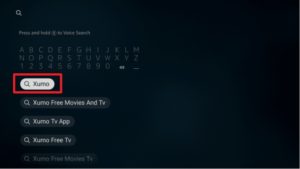
Local Channels and Live TV


4. Click the Xumo app icon when it appears on your screen
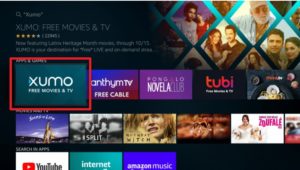
Local Channels and Live TV


5. Select the “Get” and “Download” button and wait for the app to be installed
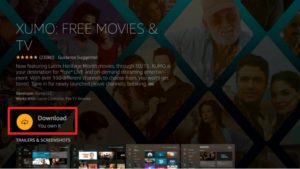
Local Channels and Live TV


6. Click “Open” to launch the app

Local Channels and Live TV


Legal Disclaimer: ReviewVPN.com does not encourage or endorse any illegal activity involved in the usage of services and applications referenced on this site. We do not verify the licensing agreements of services. The end-user is wholly responsible for ensuring that any media accessed through these services does not violate copyright and/or licensing laws. ReviewVPN does not promote, link to, or receive compensation from any Apps and IPTV services.


Install Surfshark on Firestick

Best Surfshark Deal


Locast

Locast logo

Another app that is only applicable to at least 50% of the whole United States is Locast. It offers a great live tv experience for the viewers. You can choose from channels depending on your location.

Here are some of the states that can access locast: Atlanta, Baltimore, Boston, Chicago, Dallas, Denver, Detroit, Houston, Los Angeles, Miami, Minneapolis, New York, Philadelphia, Phoenix, Puerto Rico, Rapid City, San Francisco, Seattle, Sioux Falls, Tampa Bay, Washington DC, and West Palm Beach

This app is 100% free but it sometimes asks for donations to keep the app going.

To install it on Firestick, follow these steps:

1.   Click FIND.

Local Channels and Live TV


2. Click Search.

Local Channels and Live TV


3. Type in Locast on your search engine and click on the suggestion
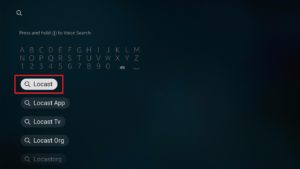
Local Channels and Live TV


4. Tap on the Locast icon when it appears
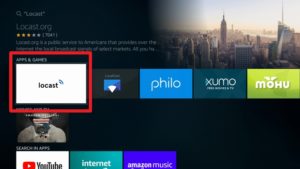
Local Channels and Live TV


5. Click the “Get” or “Download” button
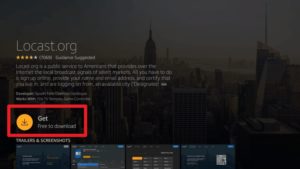
Local Channels and Live TV


6. Wait for the app to be installed on your device
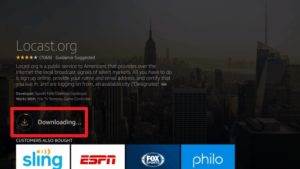
Local Channels and Live TV


7. Select the “Open” button to launch the app
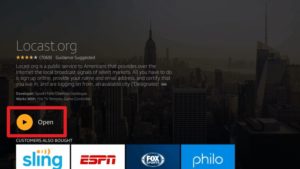
Local Channels and Live TV


8. Remember the given code and using your browser, go to locast.org/activate. PCHFKE is  just an example

Local Channels and Live TV


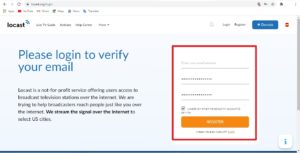
9. log in to your Locast account or create a new one by registering using your email
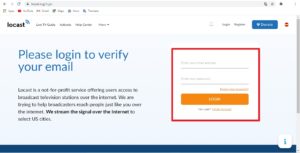
Local Channels and Live TV

Or

Local Channels and Live TV


10. Activate your Locast account by entering the given code. PCHFKE is just an example.
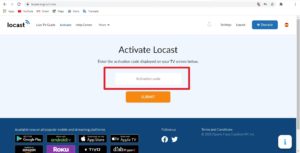
Local Channels and Live TV


11. Click on the “Submit” button to activate
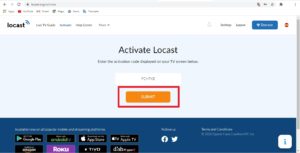
Local Channels and Live TV


12. You will see a confirmation message if you successfully activate your account
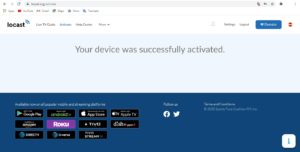
Local Channels and Live TV


13. You can now go back to your TV and enjoy Locast
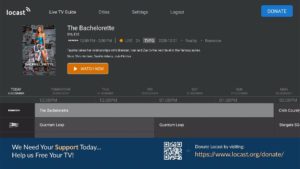
Local Channels and Live TV

Even though it is not available outside the US, you can still install it. Just follow these guidelines to install Locast wherever you are: How to Install Locast on Firestick.

Reminder: To access content within a specific City or State, connect your VPN to it.


Airy TV

Another great app for world news is Airy TV. It can also be installed directly on Firestick without any hustle. The app provides 100 channels to stream for free.

It is even available to all types of devices like Android, iPhone, macOS, and Firestick.

To know more about Airy TV, please read the Airy TV Review article.

Install Airy TV on Firestick by following these steps:

1. Click FIND.

Local Channels and Live TV


2. Click Search.

Local Channels and Live TV


3. Type in Airy TV on your search bar and select the suggestion
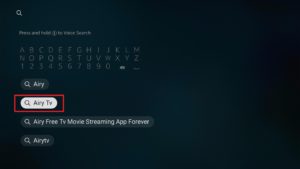
Local Channels and Live TV


4. Tap on the Airy TV app icon when it appears
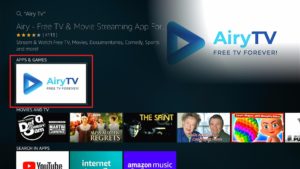
Local Channels and Live TV


5. Click the “Get” or “Download” button to install the app

Local Channels and Live TV


6. Let the app be installed on your device
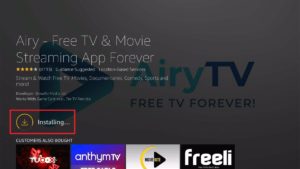
Local Channels and Live TV


7. Select the “Open” button to launch the app

Local Channels and Live TV


8. There you go, you can now start streaming on Airy TV.
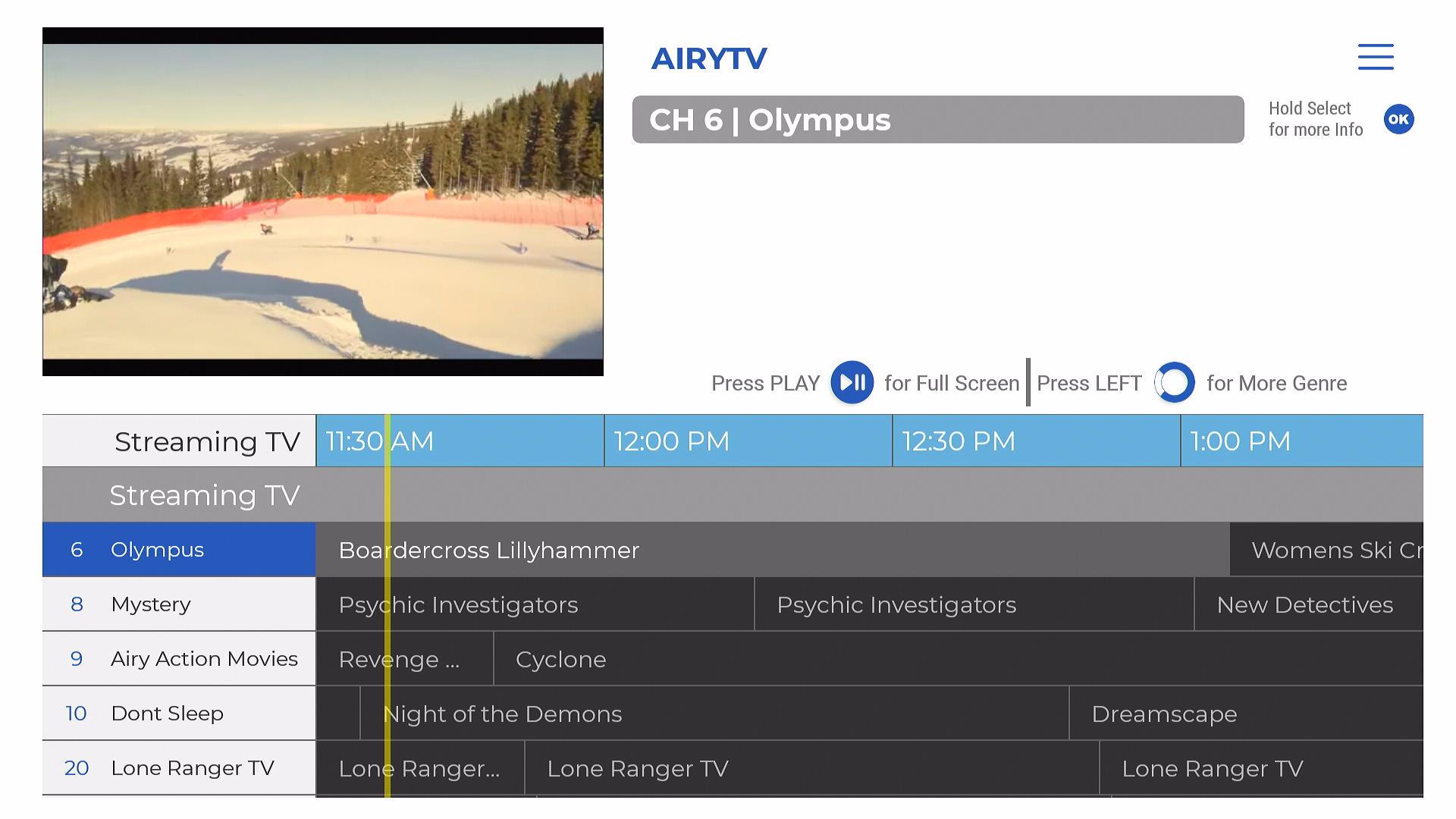
Local Channels and Live TV


ABC Channel and ABC Action News

Even the American Broadcasting Company or ABC is available on Firestick. You can install it freely and directly. Although, it is not available outside the US.

You can install ABC Action News wherever country or region you are located. Read this article to know how: Install the ABC Action News on Firestick.

To install ABC Channel inside and outside of the US, go to How to Install ABC Channel on Firestick.


NBC; MSNBC; Today

The National Broadcasting Company or NBC is one of the oldest and most popular channels in the US. It stands with ABC and CBS, and also makes its way of providing live tv for Firestick.

NBC Channel App is only available inside the USA. See it here: Install NBC App on Firestick. But you can install the MSNBC App instead.

The MSNBC App offers three major NBC live channels. These are the NBC News, Today, and the MSNBC channel itself.


Fox

Fox channels are also available on Firestick. You can stream live tv, news, and sports from this famous channel for free. You can install these apps directly on your Amazon Firestick. Take a look at these three different Fox Applications:

Fox News Channel

The Fox Business News

FoxSports Go


Local Now App

This app is an American Internet Television Service owned by The Weather Group Channel. Local Now App provides the latest updates about local news, weather updates, movies, and TV shows.

You can stream 200 local channels and even movies and tv shows for free when you use the app.

Installing the Local Nows App is no problem for Firestick users as it is an official Amazon app. To know more about the app, go to Download The Local Now App on Firestick.


Stream Safely with a VPN
surfshark logo

As mentioned above, some content from a few of these apps can’t be accessed without a VPN. You need to connect your internet to a server that is located within a country or region by which certain content is available. To do that and more, you need to use a good and premium VPN.

Here at reviewvpn.com, we always recommended using Surfshark. It is the best VPN for streaming. Not only does it allow you to access content and features that are geo-restricted, but it also protects your identity from hackers and even from your Internet Service Provider (ISP).

There is more to it than you know. IPVaish provides tons of benefits and also contains lots of great features.

The following are only a few of the many great benefits that you can have when you use Surfshark.

  • Has a total of 3200+ servers in 65 countries
  • Do not log your online activities.
  • Protects you from malware, hackers, and ISP.
  • Unblocks geo-restriction
  • Protect your data by encrypting them properly with the best VPN protocols
  • Makes your internet speed faster
  • Best VPN for torrenting
  • Prevents Firestick Buffering and Kodi Buffering


Grab your subscription now!

Click here to get the lowest price on Surfshark through our exclusive limited-time offer.


How to Install Surfshark VPN on Firestick

If your Firestick still has the older interface, read this article to learn how to update it: Update Firestick Interface.

Follow our screenshots below to install the SurfShark VPN app on your Fire TV stick.

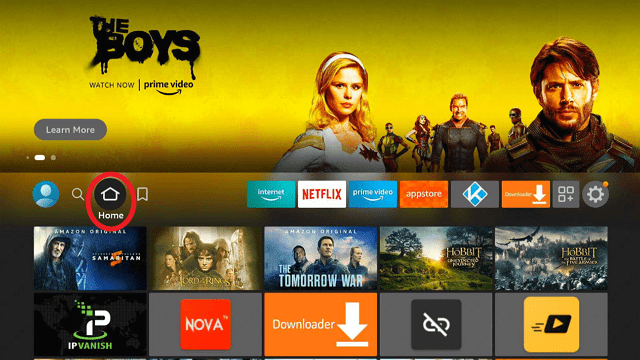
1. Go to the Home screen of your Firestick.
step 1 Install Surfshark VPN on Firestick


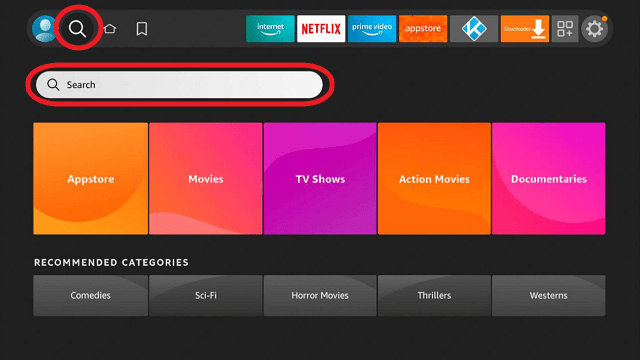
2. Navigate towards the Find tab. Press the Search button from the resulting dropdown.
step 2 Install Surfshark VPN on Firestick


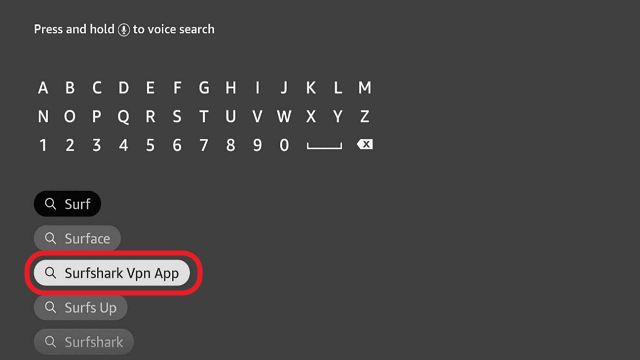
3. Type in the keyword of SurfShark and select from the suggestions that will appear.
step 3 Install Surfshark VPN on Firestick


4. Click the official SurfShark icon from your search results.
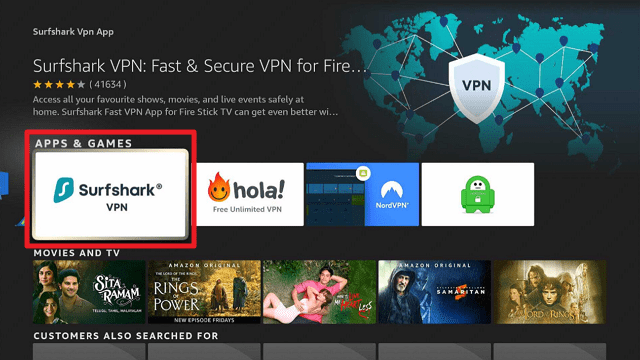
step 4 Install Surfshark VPN on Firestick


5. Press the Download (You own it) button.
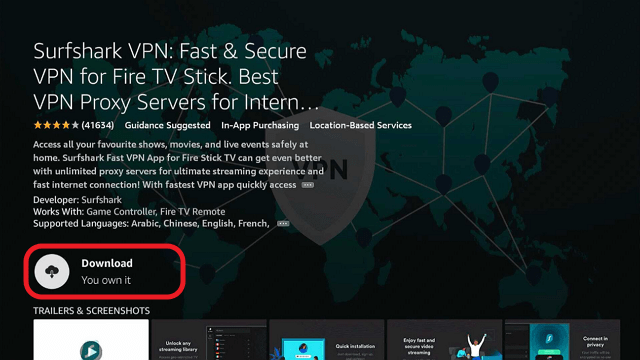
step 5 Install Surfshark VPN on Firestick


6. The SurfShark VPN installer will download on your device.
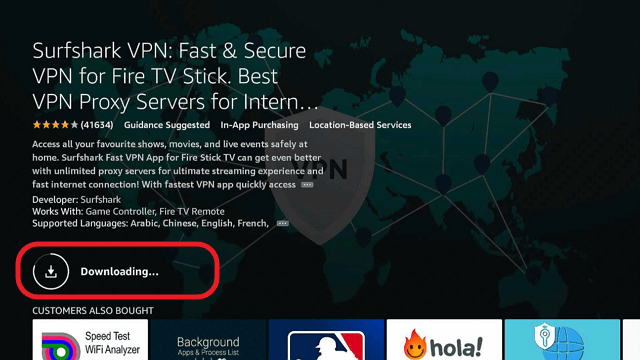
step 6 Install Surfshark VPN on Firestick


7. SurfShark VPN’s app will automatically install itself on your Fire TV stick.
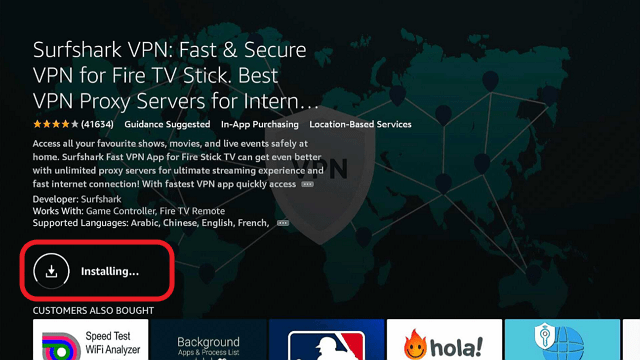
step 7 Install Surfshark VPN on Firestick


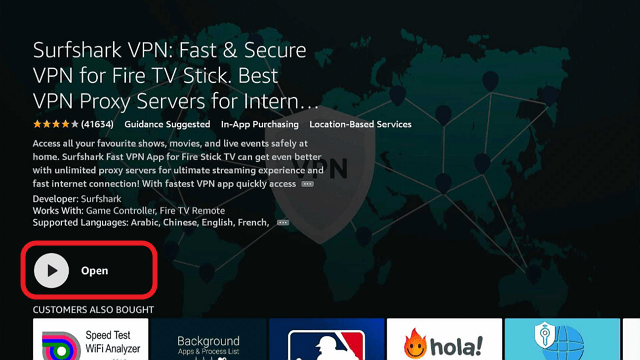
8. Press the Open button after completing SurfShark VPN’s installation process.
step 8 Install Surfshark VPN on Firestick


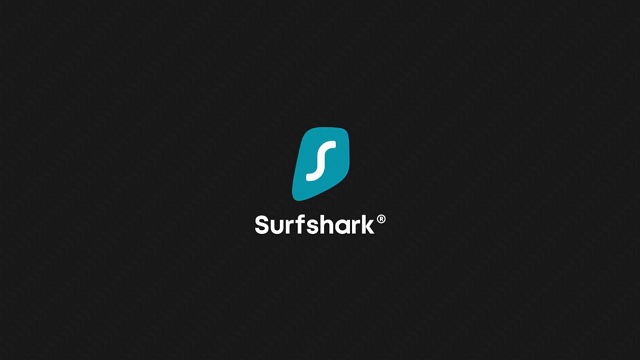
9. Please wait for the SurfShark VPN to load its user interface.
step 9 Install Surfshark VPN on Firestick


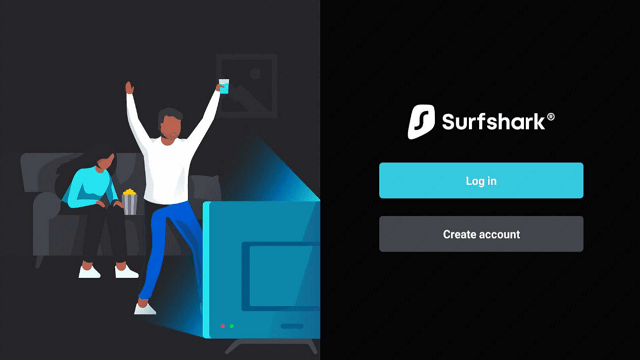
10. You can now log in with your SurfShark VPN account credentials.
step 10 Install Surfshark VPN on Firestick

Learn more about Surfshark and Grab the Best Surfshark Deal Now!


Install Surfshark on Firestick
Best Surfshark Deal


Other VPNs to Consider

NordVPN (Best for Streaming)

Best Features

  • 5000+ Server in 50+ Countries 
  • Military-Grade Encryption
  • Fast Connection Speed
  • Suitable to a lot of devices
  • No-Log Policy

Prices
  • Complete $5.89 per month (64% Discount)
  • Plus $4.59 per month (56% Discount)
  • Standard $3.69 per month (55% Discount)

Best Features

  • 750+ High-speed VPN Servers in 43 Locations
  • Military-Grade Encryption
  • Fastest HD Streaming and Gaming
  • 30-Day Money-Back Guarantee
  • Unlimited Data & Devices
  • No-Log Policy

Prices
  • 3 Years $1.99 per month (82% Discount)
  • 1 Years $3.29 per month (70% Discount)
  • 1 Month $10.99 per month

IPVanish VPN (Most Secure)

Best Features

  • 1200+ Servers in 60+ Countries around the world
  • Unlimited Connections
  • No-Log Policy
  • Top Notch Military-Grade VPN Protocols and Encryptions
  • 100% Safe and Secured
  • Most Trusted VPN
  • Best VPN for Firestick
  • 30-Day Money-Back Guarantee

Prices
  • Yearly $3.99 per month (63% Discount) – 30 days risk free + Ransomware & Malware Protection
  • Quarterly $5.32 per month (51% Discount)
  • Monthly $10.99 per month


For more VPN discounts, go to ReviewVPN Deals and purchase the best VPN for you.

Click here to get the lowest price on Surfshark through our exclusive limited-time offer.


Conclusion

It is great that popular and free local channels are now available on your Firestick. You can really watch news, sports, and live tv legally without any hassle. All of the apps present here have great live tv features, safe to use, and do not require Mouse Toggle to operate.

Make sure to use a VPN so that you can access content that may be geo-restricted in your area. We always suggest Surfshark as stated above.

We hope that this article was able to help you learn how to watch local channels and live tv on your firestick device.


What Is Your Favorite Streaming App? Cast Your Vote Below.

Best VPN for Gaming

Overview

This article will show you some of the best VPN for Gaming.


Did you wonder why you need a VPN in gaming? And why do gamers want a VPN in the first place? A Virtual Private Network or VPN is a powerful tool that secures and speeds up your connection.

Since one of the frustrating technical issues when playing online games is buffering, lags and geo-restrictions. A VPN is one of the trusted solutions that you can use to help you with these kinds of issues. 

Gamers also want to have a VPN to ensure their privacy and security when playing online and a VPN is a useful tool that gives you a high standard of security to protect you against distributed denial of service or the DDoS that attacks to knock players offline. There are lots of VPNs that you can choose out there, and this article will help you find a fitted VPN to use on gaming. 


ANONYMOUSLY


Things to Consider in Choosing a VPN for Gaming

Here are some things to consider when picking a VPN when it comes to gaming.

  • Fast Speeds
  • Compatibility
  • Strong Security and Privacy Rating
  • Numbers of servers
  • Supports peer to peer connections
  • Prices
  • Lots of Configuration Options


Install SurfShark on Firestick

Best SurfShark Deal


Legal Disclaimer: ReviewVPN.com does not encourage or endorse any illegal activity involved in the usage of services and applications referenced on this site. We do not verify the licensing agreements of services. The end-user is wholly responsible for ensuring that any media accessed through these services does not violate copyright and/or licensing laws. ReviewVPN does not promote, link to, or receive compensation from any Apps and IPTV services.


YOUR INTERNET ACTIVITY IS BEING WATCHED

ReviewVPN cannot attest to the legality, security and privacy of the applications discussed on this site. It is highly recommended that you use a VPN service while streaming or using Kodi.

Currently, your IP 216.73.216.204 is visible to everyone and your Browser is being tracked by Advertisers & ISP Provider.

Save 65% Now

Limited Time Offer

Here are the main reasons why you must use a VPN:

  • Your activities are hidden from your ISP, the government, and from the apps you are using.
  • You can access additional movies and TV streams.
  • ISP attempts to throttle are thrwarted thus reducing buffering issues.
  • Geographically restricted content like Netflix and Hulu can be unblocked.

A VPN works be replacing your ISP-assigned IP address and creating an encrypted tunnel. We recommend the no log service offered by IPVanish. It works well on a Firestick and offers the fastest possible speeds.

Special Limited Time Offer - Get IPVanish


Best VPNs for Gaming

We list down some of the best VPNs that you can use in gaming.


1. SurfShark

SurfShark is an effective and cheap VPN that is great to use in gaming. This VPN has lots of impressive features and connection speeds supported with a WireGuard protocol. It is one of the recommendable VPNs to use in online gaming that has a high[performance for the long haul and in maintaining privacy with a very cheap price in a two-year subscription that can’t be beaten. 


Speed and Bandwidth: 150-200Mbps with unlimited bandwidth.

Privacy and Security: Verified security Cure53

Servers: over 3,200+ servers in 65 countries. 

Router Setup: Yes

Simultaneous Connection: unlimited

24/7 Customer Supports: Yes

Device applicable: Windows, macOS, Linux, iOS, Android, Fire TV

Streaming (Unblock Apps: Netflix, Amazon Prime Video, BBC iPlayer, YouTube, Hulu 

Protocols and Encryption: AES-256-GCM encryption, WireGuard, OpenVPN and IKEv2

Prices: $2.49 for 24 months. 

Money-back guarantee: 30-day money-back guarantee.  

No log policy: zero logs and strictly no IP address leaks

Country Originated: British Virgin Islands

Kill Switch: Yes

P2P: Yes 


Pros and Cons of SurfShark

Pros

  • Cheap Price
  • Unlimited simultaneous connections
  • Good speeds are supported with WireGuard protocol.

Cons

  • Limited P2P servers 


Install SurfShark on Firestick

Best SurfShark Deal


2. IPVanish

IPVanish is a great techy gaming VPN that will surely provide you with lots of impressive features. It is also known as the most reliable and fast VPN, committed to giving its users a quality of service worth paying for. An award-winning VPN trusted by millions of users around the globe. You will not be disappointed in using this IPVanish, because it is packed with impressive and a quality of features to offer.


Speed and Bandwidth: the UK reaches nearly 400Mbps and 200Mbps on 1Gbps with unlimited bandwidth.

Privacy and Security: SOCKS5 web proxy

Servers: 40,000+ shared IPs, 2,000+ VPN servers in 75+ locations

Router Setup: Unmetered connections

Simultaneous Connection: Unlimited

24/7 Customer Supports:  Yes

Applicable Devices: Windows, Mac, iOS, Android, and Amazon Fire TV. 

Streaming (Unblock Apps: Netflix, BBC iPlayer, Disney+

Protocols and Encryption: 256-bit AES encryption,IKEv2, OpenVPN, and L2TP/IPsec VPN protocols

Prices:  Monthly plan of $3.49 Yearly plan of $2.62 

Money-back guarantee: 30-day money-back guarantee.  

No log policy: 100% zero logs and strictly no IP address leaks

Country Originated: United States

Supported Kill Switch: Yes

P2P: Yes 


Pros and Cons of IPVanish

Pros

  • User-friendly apps for all of your devices
  • Sync & secure 500 GB of data to access
  • Budget-friendly price. 
  • Fastest and safest VPN

Cons

  • Sometimes the connection drops dead without any alert.
  • Kill switch does not support other devices.


3. NordVPN

NordVPN is not quite as reliable and good as SurfShark, but it provides you with advanced functionality, privacy standard, and high-security features at a budget-friendly price. 

However, this VPN was then suffering from unreliable speeds lately, that is why to provide a good speed of internet it is now with the full support of WireGuard -based NordLynx protocol which is one of the fastest on the market. If you prioritize privacy when gaming online, this VPN is a good option for you.


Speed and Bandwidth: 340-350Mbps with unlimited bandwidth.

Privacy and Security: Supported Cybersec

Servers: over 5,400 servers in 59 countries

Router Setup: Yes

Simultaneous Connection: 6

24/7 Customer Supports: Yes

Applicable Devices: Windows, macOS, Linux, Android, and iOS

Streaming (Unblock Apps: Netflix, Amazon Prime Video, BBC iPlayer, YouTube, Hulu

Protocols and Encryption: 256-bit AES encryption, IKEv2/IPsec and OpenVPN 

Prices: $4.89 for a 2-year plan, $4.925 for a 1-year plan, and $11.95 for a month 

Money-back guarantee: 30-day money-back guarantee.  

No log policy: zero logs and strictly no IP address leaks

Country Originated: Panama

Kill Switch: Yes

P2P: Yes 


Pros and Cons of NordVPN

Pros

  • Rapid NordLynx speeds
  • Privacy-focused gaming VPN
  • 10 GB private cloud storage
  • Next-generation encryption

Cons

  • Torrenting is only supported on some servers.
  • Slow app and server connections.
  • Not user-friendly OpenVPN configuration


 4. ExpressVPN

 ExpressVPN is a popular VPN that is very suitable for online gaming, where it avoids throttling by giving you a high speed of connection while playing online. This VPN will also ensure that you are safe from hackers, trackers, snooping ISP, and other dangers online. This VPN is considered one of the best gaming VPNs on the markets that serve you with excellent privacy and security features.


Speed and Bandwidth: US speeds are 220MB on a 600MB line with unlimited bandwidth.

Servers: 3,000+ VPN servers in 160 locations in 94 countries

Router Setup: Yes

Simultaneous Connection: 5

24/7 Customer Supports: Yes

Applicable Devices: Windows, Mac, iOS, Android, Amazon Fire TV, Linux, game consoles.

Streaming (Unblock Apps: Netflix, Amazon Prime Video, BBC iPlayer, YouTube, Hulu 

Protocols and Encryption: 256-bit AES encryption, OpenVPN and IKEv2, Lightway, WireGuard, L2TP/IPsec, PPTP, SSTP

Prices: $12.95 month, $59.95 six months, and $99.95 annually

Money-back guarantee: 30-day money-back guarantee.  

No log policy: 100% zero logs and strictly no IP address leaks

Country Originated: British Virgin Islands

Kill Switch: Network Lock

P2P: Yes 


Pros and Cons of ExpressVPN

Pros

  • VPN split tunneling
  • Best in class encryption
  • Defeat ISP throttling
  • It accepts any online payment option.

Cons

  • Only 5 devices at once.


5. Hotspot Shield

Hotspot Shield is a well-known free VPN that works well as a gaming VPN. This VPN serves users with a good quality of service and benefits such as incredible speeds supported with Catapult Hydra protocol. However, this VPN has minor logging issues, such as collecting bandwidth used and more data, but it also claims that no information can identify you. You can use this VPN fr gang a to provide you an ultra-fast internet connection. 


Speed and Bandwidth: 330-410Mbps with unlimited bandwidth.

Privacy and Security: Verified security Cure53

Servers: 3,200+ ultra-fast VPN servers in 70+ countries

Router Setup: Yes

Simultaneous Connection: 5

24/7 Customer Supports: Yes

Device applicable: Windows, macOS, iOS, Android, Linux, Smart TVs, routers, and more.

Streaming (Unblock Apps): Netflix, Amazon Prime Video, BBC iPlayer, YouTube, Hulu  

Protocols and Encryption: AES-256-GCM encryption, Hydra, OpenVPN, PPTP, SSTP IPSec, L2TP, IKEv2

Prices: Premium $7.99/mo, Family $11.99/mo

Money-back guarantee: 45-day money-back guarantee.  

No log policy: zero logs and strictly no IP address leaks

Country Originated: Ukraine and Russia

Kill Switch: Yes

P2P: Yes 


6. CyberGhost

CyberGhost is a Romanian and German-based privacy provider great for online gaming. This VPN service is trusted with more than 15 million users because of its quality service they offer. It also lets you access different regions of the PlayStation and enjoy every game you love to play. You can set up your VPN connection directly on your router. This VPN will ensure you are safe and protected while playing online games, as it will safely hide your IP address to keep you away from online hackers and trackers. 


Speed and Bandwidth: 58Mbps with unlimited bandwidth.

Privacy and Security: DNS and IP leak protection

Servers: 7,200+ servers in 110+ locations across 91 countries

Router Setup: Yes

Simultaneous Connection: 7

24/7 Customer Supports: Yes

Device applicable: Windows, macOS, Linux, iOS, Android, Fire TV

Streaming (Unblock Apps: Netflix, Amazon Prime Video, BBC iPlayer, YouTube, Hulu 

Protocols and Encryption: 256-bit AES and OpenVPN, IKEv2, WireGuard® protocols

Prices: $2.25/mo for 3 years, $3.99/mo for 1 year, $12.99 for 1 month  

Money-back guarantee: 45-day money-back guarantee.  

No log policy: Strictly no logs and strictly no IP address leaks

Country Originated: Romania and Germany

Kill Switch: Yes

P2P: Yes 


Pros and Cons of CyberGhost

Pros

  • Multi-platform support
  • Budget-friendly
  • DDoS-protected, and a NAT firewall
  • A lot of servers supported

Cons

  • Poor speed connection


Free VPNs That Can Be Considered

Here are some of the free VPN that you can try. 


1. ProtonVPN

ProtonVPN is a completely free VPN that is a popular provider from Switzerland. It offers a user-friendly interface that has good encryption of AES 256-bit. However, this VPN only has 3 save locations and one 1 simultaneous connection. The good thing about it is it has no data or speed limits, no advertisement, no-log policy, and is protected by Swiss privacy laws.


2. Hide.me

Hide.me is another completely free VPN that allows torrents, but it is denied access to Netflix. The free version of this VPN has 24/7 customer support and only has 4 server locations. This VPN also allows only 1 simultaneous connection and has a data limit of 10GB per month. 


3. TunnelBear

TunnelBear is the most reliable provider offering a free service. The Interface of this VPN is very clean, fun, and easy to use. It has a data limit of 500MB per month. This VPN is supported with AES 256-Bit encryption that serves 26 locations.


VPN to Avoid

Here are some of the VPN that you should avoid. These VPNs have been caught red-handed in trickling activity, selling users’ data, keeping logs, and more privacy issues. If you value your privacy and don’t want to protect your device from malware, you should not even try these VPNs. 


1. Hola

This VPN is caught doing “exit nodes” or allowing other Hola users to route their traffic through said nodes. 


2. HideMyAss

 The FBI tracked a hacker’s activity in this VPN in 2011.


3. Opera Free VPN

 This VPN is reportedly collecting usage data from users and shared with third parties.  


4. PureVPN

The FBI has tracked and arrested an alleged stalker in this VPN in the year 2017. 


5. VPNSecure

This VPN has been found to have IP leaks and DNS leaks.


Install SurfShark on Firestick

Best SurfShark Deal


What To Do and What is Not To Do

To Do

  • Choose a safe and reliable VPN
  • Connect to a VPN before you play online.
  • Connect to a fast and suggested server. 
  • Protect yourself against online dangers.
  • Secure your personal data and traffic. 


Not To Do

  • Play restricted online games without a VPN connection. 
  • Use unrestricted networks. 
  • Connect to unsafe VPN
  • Take advantage of VPN by hacking. 
  • Access to unknown free VPN online.


Surfshark vpn

Install SurfShark on Firestick with Screenshots

If your Firestick still has the older interface, read this article to learn how to update it: Update Firestick Interface.

You can download Surfshark directly from the Amazon App store. It will be easy for you to find Surfshark with your Firestick’s Find feature. Refer to our screenshots below.

Follow our screenshots below to install the SurfShark VPN app on your Fire TV stick.

1. Go to the Home screen of your Firestick.

step 1 Install Surfshark VPN on Firestick


2. Navigate towards the Find tab. Press the Search button from the resulting dropdown.

step 2 Install Surfshark VPN on Firestick


3. Type in the keyword of SurfShark and select from the suggestions that will appear.

step 3 Install Surfshark VPN on Firestick


4. Click the official SurfShark icon from your search results.

step 4 Install Surfshark VPN on Firestick


5. Press the Download (You own it) button.

step 5 Install Surfshark VPN on Firestick


6. The SurfShark VPN installer will download on your device.

step 6 Install Surfshark VPN on Firestick


7. SurfShark VPN’s app will automatically install itself on your Fire TV stick.

step 7 Install Surfshark VPN on Firestick


8. Press the Open button after completing SurfShark VPN’s installation process.

step 8 Install Surfshark VPN on Firestick


9. Please wait for the SurfShark VPN to load its user interface.

step 9 Install Surfshark VPN on Firestick


10. You can now log in with your SurfShark VPN account credentials.

step 10 Install Surfshark VPN on Firestick

Learn more about Surfshark and Grab the Best Surfshark Deal Now!


Install Surfshark on Firestick
Best Surfshark Deal

Other VPNs to Consider

NordVPN (Best for Streaming)

Best Features

  • 5000+ Server in 50+ Countries 
  • Military-Grade Encryption
  • Fast Connection Speed
  • Suitable to a lot of devices
  • No-Log Policy

Prices
  • Complete $5.89 per month (64% Discount)
  • Plus $4.59 per month (56% Discount)
  • Standard $3.69 per month (55% Discount)

Best Features

  • 750+ High-speed VPN Servers in 43 Locations
  • Military-Grade Encryption
  • Fastest HD Streaming and Gaming
  • 30-Day Money-Back Guarantee
  • Unlimited Data & Devices
  • No-Log Policy

Prices
  • 3 Years $1.99 per month (82% Discount)
  • 1 Years $3.29 per month (70% Discount)
  • 1 Month $10.99 per month

IPVanish VPN (Most Secure)

Best Features

  • 1200+ Servers in 60+ Countries around the world
  • Unlimited Connections
  • No-Log Policy
  • Top Notch Military-Grade VPN Protocols and Encryptions
  • 100% Safe and Secured
  • Most Trusted VPN
  • Best VPN for Firestick
  • 30-Day Money-Back Guarantee

Prices
  • Yearly $3.99 per month (63% Discount) – 30 days risk free + Ransomware & Malware Protection
  • Quarterly $5.32 per month (51% Discount)
  • Monthly $10.99 per month

For more VPN discounts, go to ReviewVPN Deals and purchase the best VPN for you.


 FAQs

Why do I need a gaming VPN?

A VPN on gaming is very useful because it will give all kinds of benefits online, such as playing restricted games by connecting your device to any server. A VPN will ensure that you are safe while playing online and will give you a high-speed connection. 


Is it legal to use a VPN for gaming?

Yes, a VPN for gaming is 100% legal.


Is it safe to use a free VPN for gaming?

Yes, VPNs are very safe to use, and will also ensure your safeties and privacy online. 


Can I play online games without a VPN?

Yes, but we highly recommend using a VPN while you play online. 


Conclusion

A Virtual Private Network is a powerful tool to use on any activities online, where it will provide you a convenient and flexible online gaming experience. This VPN is also a great tool to use in speeding up connections and ensures your device is protected from any kind of issues online. Choosing the best VPN to use in gaming must be prioritized because this VPN will be your online companion. We highly suggest using SurfShark as your best choice as it gives you a high standard of service worth paying for. It is an award-winning VPN that is very useful in gaming. We hope that this article shows you the best VPNs in gaming. 

How to Install LivePlanet TV on Firestick

Overview

In this article, we will show you how to install LivePlanet TV on your Amazon Firestick device.

LivePlanet TV is an IPTV protocol-based application. It can stream television shows and movies on your device. LivePlanet TV can make television signals available for viewing on your gadget.


The application of LivePlanet TV offers channels from worldwide sources. Accessing these channels is unlimited and free of charge. It is software developed from android devices. The app can be installed on androids and the Amazon Firestick. Users can watch channels from the United States. You can also choose channels from France or the United Kingdom. There are different selections any individual can utilize for streaming. Enjoy the exclusive media content in several languages.

LivePlanet TV is not an official application from Amazon. To install, you have to Jailbreak your Firestick and Install the Downloader application


ANONYMOUSLY


LivePlanet TV Downloader for Android Devices


LivePlanet TV

Note: ReviewVPN.com does not host this APK file. It is hosted by Archive.org


How to Install LivePlanet TV on Firestick

Here is a brief guide to the LivePlanet TV app’s installation on your Amazon Firestick.

  1. Open your Firestick Settings Tab.
  2. Choose the My Fire TV icon.
  3. Go inside the Developer options.
  4. Turn on the Apps from Unknown Devices option.
  5. Enable ADB Debugging.
  6. Return to your Home Screen.
  7. Use the Search Bar.
  8. Input Downloader app.
  9. Click on the Downloader option.
  10. Get the Downloader app.
  11. Install the Downloader app.
  12. Open the Downloader app.
  13. Select Allow.
  14. Press OK.
  15. Type in https://reviewvpn.com/livp
  16. LivePlanet TV’s APK file will download.
  17. Click on Install.
  18. LivePlanet TV will install Firestick.
  19. Open the LivePlanet TV app to stream television channels.


Install SurfShark on Firestick

Best SurfShark Deal


Legal Disclaimer: ReviewVPN.com does not encourage or endorse any illegal activity involved in the usage of services and applications referenced on this site. We do not verify the licensing agreements of services. The end-user is wholly responsible for ensuring that any media accessed through these services does not violate copyright and/or licensing laws. ReviewVPN does not promote, link to, or receive compensation from any Apps and IPTV services.


YOUR INTERNET ACTIVITY IS BEING WATCHED

ReviewVPN cannot attest to the legality, security and privacy of the applications discussed on this site. It is highly recommended that you use a VPN service while streaming or using Kodi.

Currently, your IP 216.73.216.204 is visible to everyone and your Browser is being tracked by Advertisers & ISP Provider.

Save 65% Now

Limited Time Offer

Here are the main reasons why you must use a VPN:

  • Your activities are hidden from your ISP, the government, and from the apps you are using.
  • You can access additional movies and TV streams.
  • ISP attempts to throttle are thrwarted thus reducing buffering issues.
  • Geographically restricted content like Netflix and Hulu can be unblocked.

A VPN works be replacing your ISP-assigned IP address and creating an encrypted tunnel. We recommend the no log service offered by IPVanish. It works well on a Firestick and offers the fastest possible speeds.

Special Limited Time Offer - Get IPVanish


App Features

  • Features 1500 channels from different worldwide sources.
  • Daily addition of regular channels based upon the user demands 
  • 100% free to use anywhere in the world without additional costs 
  • Provides an integrated built-in player for streaming various channels. 
  • Ads do not show up while channel streaming. 
  • Ensures user convenience.
  • Minimal storage allocation for the LivePlanet TV.
  • Easy Installation Procedure 
  • No problems related to storage and RAM. 
  • Watch your favorite channels in high-definition and maximum quality. 
  • The main search bar is present to ensure user convenience. 
  • Straightforward and user-friendly interface
  • The app does not require registration. 
  • Download the official LivePlanet TV APK file and install it.


LivePlanet TV Built-In Players

  • MX Player
  • VLC Player
  • 321 Player
  • LocalCast
  • XYZ Player
  • Default Player


LivePlanet TV Home Selection

  • Live
  • Latest
  • Favorites
  • Recent
  • Player Selection
  • Donate
  • Communicate


LivePlanet TV Content

  • Total of 1500 International Channels
  • Stream from different countries
  • Choose from various language settings
  • Change Language of television shows


LivePlanet TV Channels

  • Arabic
  • France
  • Germany
  • India
  • Kids TV
  • Pakistan and more.

Pros and Cons

Pros

  • 100% Free
  • Global Channel sources
  • Diverse media content from several countries
  • Built-in Media Player
  • Several Media Player Choices
  • International Live Channels
  • Numerous Media Categories
  • Latest Media Streams and recent Global Entertainment

Cons

  • Requires Google Play services not supported by the Amazon Firestick.


Stream Media files with a VPN

ISP can monitor your online footprint. The information they gather can be used for various methods.

Downloading online media files may disrupt your internet connection. The IP requests subsequent loads from the main server. It may result in stuttering and buffering.

A weakened connection may hinder your downloads and internet speed. It is why we recommend a powerful VPN like SurfShark.

Many VPNs are available on the web. SurfShark is designed for the safe streaming of high-quality television broadcasts. It can also be used simultaneously with media file downloads.

SurfShark is the best companion while streaming international channels.

Here are the benefits that SurfShark can offer you:

  • ISP tracking is prevented.
  • Digital bridges neutralize geo-blocks.
  • Conceals your personal information and credentials.
  • Protects your device from viruses and malware.
  • Anonymizes your network, online activities, and personal data.
  • Improves your internet connection.
  • Faster download of online media files.
  • Prevents the onset of Firestick and Kodi buffering.


Update your Firestick Interface

If your Firestick has an old interface, you can now upgrade it by visiting our article about Updating Firestick Interface.


The Best Firestick Browser

Streaming quality videos online can require the use of effective browsers. If you are using a Firestick, then Amazon’s Silk Browser is highly recommended.

You can follow our guide for the installation of the Amazon Silk Browser on Firestick. You can also learn more about its capabilities.


Grab your subscription now!

Click here to get the lowest price on SurfShark through our exclusive limited-time offer.


How to Install Surfshark on Firestick with Screenshots

If your Firestick still has the older interface, read this article to learn how to update it: Update Firestick Interface.

You can download Surfshark directly from the Amazon App store. It will be easy for you to find Surfshark with your Firestick’s Find feature. Refer to our screenshots below.

Follow our screenshots below to install the SurfShark VPN app on your Fire TV stick.

1. Go to the Home screen of your Firestick.

step 1 Install Surfshark VPN on Firestick


2. Navigate towards the Find tab. Press the Search button from the resulting dropdown.

step 2 Install Surfshark VPN on Firestick


3. Type in the keyword of SurfShark and select from the suggestions that will appear.

step 3 Install Surfshark VPN on Firestick


4. Click the official SurfShark icon from your search results.

step 4 Install Surfshark VPN on Firestick


5. Press the Download (You own it) button.

step 5 Install Surfshark VPN on Firestick


6. The SurfShark VPN installer will download on your device.

step 6 Install Surfshark VPN on Firestick


7. SurfShark VPN’s app will automatically install itself on your Fire TV stick.

step 7 Install Surfshark VPN on Firestick


8. Press the Open button after completing SurfShark VPN’s installation process.

step 8 Install Surfshark VPN on Firestick


9. Please wait for the SurfShark VPN to load its user interface.

step 9 Install Surfshark VPN on Firestick


10. You can now log in with your SurfShark VPN account credentials.

step 10 Install Surfshark VPN on Firestick

Learn more about Surfshark and Grab the Best Surfshark Deal Now!


Install Surfshark on Firestick

Best Surfshark Deal

Other VPNs to Consider

NordVPN (Best for Streaming)

Best Features

  • 5000+ Server in 50+ Countries 
  • Military-Grade Encryption
  • Fast Connection Speed
  • Suitable to a lot of devices
  • No-Log Policy

Prices
  • Complete $5.89 per month (64% Discount)
  • Plus $4.59 per month (56% Discount)
  • Standard $3.69 per month (55% Discount)

Best Features

  • 750+ High-speed VPN Servers in 43 Locations
  • Military-Grade Encryption
  • Fastest HD Streaming and Gaming
  • 30-Day Money-Back Guarantee
  • Unlimited Data & Devices
  • No-Log Policy

Prices
  • 3 Years $1.99 per month (82% Discount)
  • 1 Years $3.29 per month (70% Discount)
  • 1 Month $10.99 per month

IPVanish VPN (Most Secure)

Best Features

  • 1200+ Servers in 60+ Countries around the world
  • Unlimited Connections
  • No-Log Policy
  • Top Notch Military-Grade VPN Protocols and Encryptions
  • 100% Safe and Secured
  • Most Trusted VPN
  • Best VPN for Firestick
  • 30-Day Money-Back Guarantee

Prices
  • Yearly $3.99 per month (63% Discount) – 30 days risk free + Ransomware & Malware Protection
  • Quarterly $5.32 per month (51% Discount)
  • Monthly $10.99 per month

For more VPN discounts, go to ReviewVPN Deals and purchase the best VPN for you.


Alternative Apps

Engineers have created various software for multiple devices. You can use these apps for streaming movies and television shows. Here are alternative apps if LivePlanet TV malfunctions on Firestick:

For more alternative app suggestions, you can visit our article about the best Live TV app recommendations.


FAQs

Is LivePlanet TV for free?

Yes. LivePlanet TV is 100% free for download on your Firestick and android.


Are there ads while using the LivePlanet TV app?

No ads are reported by the app users.


Conclusion

The LivePlanet TV application uses IPTV protocol. It is capable of accessing various international television channels. You can view media entertainment from different countries. All the content included is properly organized. The app also features several media players aside from its default.

We hope this article has helped with your installation of the LivePLanet TV app on your Amazon Firestick device.

2