Best VPNs for Linux

Best VPN for Linux Overview

In this article, we will show you the list of the best VPN for Linux

Linux is a must-have for a few, and an enigma for most. The world of computers is run on Windows. It has become the DeFacto Operating System for many because it’s easy to use. This is mainly down to their GUI (Graphical User Interface)

Linux is an open-source distribution coded almost single-handedly by Linus Torvalds who released it in 1991. The OS has since gone on to be supported by an enormous community of programmers who upkeep the source code and are constantly releasing new versions.

People love Linux because there is only one Windows you can use. But there are hundreds of Linux OS.

Want something like Windows? pick Linux Mint.

Want a secure and anonymous OS? Pick Linux Tails.

The list goes on. Also, it tends to be very quick to load and has unlimited configurability in terms of choosing what you do and don’t want to run in the background.

So if you are one of those people who use Linux, it is better to still stay protested while streaming. A Virtual Private Network or VPN is such a great tool to secure your online identity while giving you the freedom to access geo-restricted content and features. 

As you continue to read this article, you will see the best VPN for Linux


ANONYMOUSLY


Best VPN for Linux

SurfShark

Surfshark vpn

SurfShark is indeed the best VPN for Linux. It has all of the features and security protocols that you need that are applicable to Linux devices.

SurfShark has thousands of available servers from numerous countries worldwide that you can connect to. It will serve as a great tunnel that makes you look like you are connected to a particular country rather than your own. This will grant you access to unblock geo-restricted platforms, features, and content.

You will be amazed by all of the best VPN protocols of SurfShark, making it really great for the title of the best VPN for Linux.

SurfShark follows the No-Log policy which is important because this software won’t record any activity and data of the user.

What’s also amazing is that it is very affordable and has a 30-day “risk-free” money-back guarantee.

Other amazing and advanced features of SurfShark include: Cloud Storage, P2P friendly, SOCKS5 Proxy, best for Torrenting, Kill Switch, Split Tunneling, DNS Leak Protection, and prevents Firestick Buffering and Kodi Buffering

If you want to learn more, read this Surfshark VPN review.

Install Surfshark on Firestick


Grab your subscription now!

Best Surfshark Deal

NordVPN

NordVPN is the biggest VPN on our list. This is why it is a good candidate for being the best VPN for Linux. With millions of users and one of the biggest collections of servers of any provider. 5,500+ servers in 60+ countries. NordVPN has built a solid reputation for speed and security.

They probably offer some of the largest arrays of features of any VPN provider. CyberSec allows you to block malicious websites, scripts, and ads. DoubleVPN encrypts your data twice. Your data pops out of VPN server 1 and goes through VPN Server 2. Meaning that if anyone does manage to backtrace your IP, they will just get thrown to another VPN server.

Their No Logs policy has stood up against a criminal investigation and held. Just like ExpressVPN, they don’t log in, and this has been shown to be true. If you record nothing, then you have nothing to show when asked.

You won’t be found wanting access to popular media streaming sites, as Netflix gives you click icons to 400+ popular sites. As well as enjoying an ever-growing server list to watch the latest show on Netflix.

NordVPN is also cheap. With a 3-year plan starting from as little as $2.99 per month, you certainly won’t be left out of pocket with one of the most popular VPN providers around.

Learn more by reading our NordVPN Review.

How to Install NordVPN on Firestick


Grab your subscription now!

Best NordVPN Deal


YOUR INTERNET ACTIVITY IS BEING WATCHED

ReviewVPN cannot attest to the legality, security and privacy of the applications discussed on this site. It is highly recommended that you use a VPN service while streaming or using Kodi.

Currently, your IP 178.91.199.198 is visible to everyone and your Browser is being tracked by Advertisers & ISP Provider.

Save 65% Now

Limited Time Offer

Here are the main reasons why you must use a VPN:

  • Your activities are hidden from your ISP, the government, and from the apps you are using.
  • You can access additional movies and TV streams.
  • ISP attempts to throttle are thrwarted thus reducing buffering issues.
  • Geographically restricted content like Netflix and Hulu can be unblocked.

A VPN works be replacing your ISP-assigned IP address and creating an encrypted tunnel. We recommend the no log service offered by IPVanish. It works well on a Firestick and offers the fastest possible speeds.

Special Limited Time Offer - Get IPVanish


IPVanish

IPVanish Logo

IPVanish is another best VPN for Linux. With 40,000+ IPs across 2,000+ servers and 70+ countries, IPVanish offers great speed and functionality. Wherever you are in the world you’ll be sure to connect to a service that is close to you, fast, and anonymous.

They have a solid zero logs policy. This means that your data is not logged, and your anonymity online will be maintained. Their plans start from as little as $6.49 per month with a 7-day money-back guarantee. You can torrent your heart out and can connect to a massive unlimited simultaneous device. This is a big bonus for all your hardcore technology users who need to have a lot of devices going at the same time. Most VPN providers will only give you 5 connections maximum at any one time.

IPVanish works a treat for any geographically restricted content like BBC iPlayer’s, Netflix, and Hulu, as well as allowing P2P traffic. Their speeds are excellent, so you want to have to wait to buffer your favorite show.

In terms of security, IPVanish offers 256-bit AES encryption, making your connection secure and unbreakable. You can also choose from a wide range of security protocols including OpenVPN and L2TP/IPsec.

IPVanish is also one of the few providers we know that offer fantastic customer support. Lodge a ticket, speak to a customer service representative 24/7 online, or even call their offices directly. Having the chance to speak to someone on the phone in the VPN industry is rare and refreshing, particularly if you are a newcomer to VPNs.

Read our IPVanish review to know more.

How to Install IPVanish on Firestick

Grab your subscription now!

Best IPVanish Deal


Atlas VPN

atlas vpn

It was just recently when Atlas VPN became available for Linux. Even being new in the industry, it surpasses others and became a great candidate for the best VPN for Linux.

Like other great VPNs, Atas VPN has 256-bit AES encryption, but with a limited number of VPN protocols. 

It also follows the no-log policy and secures the user’s online identity with a total of 750+ servers worldwide.

What’s amazing is that you can use your Atlas VPN account with an unlimited number of connected devices simultaneously.

To learn more, read our Atlas VPN review.


Grab your subscription now!

Best Atlas VPN Deal


Best VPN for Linux Conclusion

The best VPN for Linux we suggest is SurfShark. It has the latest VPN protocols for securing your device. You can avoid ISP throttling and cyber threats while using Linux to browse the internet.

You can also consider NordVPN, IPVanish, and the newly added VPN to the list, Atlas VPN.


Final Words

We hope this article shares with you the best VPN for Linux. Thank you for reading!

Best VPNs for Android

Best VPNs for Android

In this article, we will show you the best VPNs for Android.

Most users prefer Android devices. Through these smartphones, there is no problem surfing the internet anymore. But we need to be careful while streaming on different sites, and apps using our Android devices. Most websites and apps track our online activities, making our information open to a lot of domains, etc.

By using a Virtual Private Network or VPN, we can protect ourselves from hackers, and trackers. It will also give us access to a lot of features and content that are geo-restricted in our location.

As you continue to read this article, you will learn all the best VPNs you can use on your Android device.


ANONYMOUSLY


What Makes a Good Android VPN?

Though Android users are far away from those using Apple. Users who use the Apple Store spend 4 times as much as the Google Play Store. That’s because most Android users are in developing markets like India and China.

This has meant that a lot of emphases is placed on developing an iOS application, leaving the Android mobile application as an afterthought.

The code can be similar but it’s not the same. Some companies may simply try to copy the Apple product and end up with problems in terms of UI and US (User Interface and Experience)

This is changing, but there are a few things to look out for when choosing a good Android VPN and mobile application.

Resource Usage

A VPN connection will use RAM as well as see some reduction in baseline internet speed. This can be anywhere from 5-30%. This is often mitigated by anonymizing your IP and giving you the fastest possible speed if your ISP has a habit of throttling connections in your area.

Ultimately you want a VPN that is going to reduce speed as much as possible and use resources transmitting to the VPN’s server using the application.

Often the more functional and simpler the application the fewer resources it will use. Always choose style over substance if the app is easy to use.


Speed

Chances are if you are using an Android mobile application you are going to be connecting wirelessly, for browsing or streaming. More data-heavy usage is reserved for computers.

If you can ping test your starting speed connected to your internet without a VPN and then ping again when connected using your VPN. 

All the providers in our Top 5 list have shown they can maintain fast speeds consistently. 

Another factor to bear in mind is location. Servers for some providers in Asia and Latin America can be slower. So, make sure you test and check these first. All reputable VPNs will give you 7-60 days for a money-back guarantee, so check it all out in the first week before deciding.


Streaming and Torrenting

A torrent is a file you download to watch later, while a stream is real-time media. If you are traveling or going somewhere where the internet connection is spotty, you can download media files onto your phone to watch later.

Get a VPN that has high-speed servers, or even better P2P servers which are specifically configured for downloading and uploading.


Application Quality

Finding a quality Android application is not as easy as you would think. Often mobile applications will have reduced functionality compared to web applications because your usage is simplified.

But it should be easy to use, intuitive and snappy. Allowing you to connect quickly. Some applications will have an inbuilt kill switch that stops the internet if your VPN freezes, and you can even set others to start as soon as your phone is on.

Finally, you want an application that is easy to navigate and has all the functions you want. Again, a nice-looking app is great only if it does everything you want it to do.


Top 5 Best VPNs for Android

SurfShark

Surfshark vpn

SurfShark ranks top 1 on our list of the best VPNs for Android. It works well with any device most especially with Android.

They have a rigorous zero logs policy, which has been tested, and are an outspoken voice for internet privacy and personal freedom. With over 3,200 servers in 65+ countries, you can also be sure that wherever you are in the world, you are never far from a super-fast connection.

SurfShark has also modified 1,000 of its servers specifically for P2P and super-fast streaming. 

The application is super easy to use. With the familiar one tap the on/Off function for your VPN. You also have an in-built kill switch and can tell the app to secure any Wi-Fi service before your phone connects. It also lets you have the option to favorite your chosen servers so you can quickly connect next time, as well as heaps of additional options to configure security and connection.

You can use SurfShark on an unlimited number of devices simultaneously.

For a more detailed review, read our SurfShark VPN review, and also learn How to Install SurfShark on Firestick.


Grab your subscription now!

Best Surfshark Deal


NordVPN

NordVPN is the most downloaded VPN for Android with over 10 million installations. It offers an impressive mobile experience. The company’s reputation puts it’s it at the top 5 of any list regarding VPN providers.

NordVPN is amazing with 5,000+ servers in 60+ countries. You can enjoy military-style encryption. It also offers a host of additional features like Cyber Sec that blocks malicious websites and malware. NordVPN also offers a Double VPN that gives you the option to route your connection through 2 VPN servers and make your IP untraceable.

You get a 7-day free trial with the Android App. It uses a similar style seen in a few big names. A simple on/Off button connects you to the server which is best for you. Depending on your criteria. You can pick the fastest or go and find another server manually.

You can also connect the application to Android TV, or access P2P-supported servers for fast torrents. What we really liked about NordVPN is they seem to be taking the time to reply to every comment posted on the Google Play Store and we saw evidence of them implementing fixes suggested by the community

You can connect 6 simultaneous devices.

Read our NordVPN review to know more about this VPN

How to Isntall NordVPN on Firestick


Grab your subscription now!

Best NordVPN Deal


YOUR INTERNET ACTIVITY IS BEING WATCHED

ReviewVPN cannot attest to the legality, security and privacy of the applications discussed on this site. It is highly recommended that you use a VPN service while streaming or using Kodi.

Currently, your IP 178.91.199.198 is visible to everyone and your Browser is being tracked by Advertisers & ISP Provider.

Save 65% Now

Limited Time Offer

Here are the main reasons why you must use a VPN:

  • Your activities are hidden from your ISP, the government, and from the apps you are using.
  • You can access additional movies and TV streams.
  • ISP attempts to throttle are thrwarted thus reducing buffering issues.
  • Geographically restricted content like Netflix and Hulu can be unblocked.

A VPN works be replacing your ISP-assigned IP address and creating an encrypted tunnel. We recommend the no log service offered by IPVanish. It works well on a Firestick and offers the fastest possible speeds.

Special Limited Time Offer - Get IPVanish


IPVanish

IPVanish Logo

IPVanish makes almost any list of the Top 5 for VPNs. With a great reputation for customer service, stability, and speed. They also differentiate themselves by owning all their infrastructure. From the VPN servers to the DNS and in-house technology team. Many VPN providers use third-party providers which can present a security risk. Third parties can be motivated to sell data to advertisers.

You can access 40,000+ IP addresses in 70+ countries. Unlike other providers, IPVanish uses IP Sharing, which means multiple users look like they are using the same IP. This helps to keep your browsing history safe, as even in the unlikely case that your IP is tracked, there is no possible way to distinguish your traffic from anybody else’s.

The mobile application offers a host of cool functions, including being able to monitor your connection speeds, advanced security features including the type of security protocol you want to use with your connection, and an easy one-click quick connect function. IPVanish will also automatically secure an unsecured Wi-Fi connection and encrypts everything you do online including your emails and messages sent through other applications.

Their security is the maximum level of encryption used by the US military, and they are one of the few providers who offer 24/7 assistance via online chat or a telephone number. 

Read our IPVanish review to know more.

How to Install IPVanish on Firestick

Grab your subscription now!

Best IPVanish Deal


Atlas VPN

atlas vpn

Atlas VPN is the only provider to make our list that has a free as well as a premium service. With the free service, you get a generous 10GB data allowance per month and access to 3 servers. Normally you would get 3-5 locations.

What we love about Atlas VPN is the tonnes of functionality that you get with their paid service.

You can access 750+ servers across different countries with paid plans and a solid zero-log policy to boot. The app also lets you see the usage and speed of all country’s servers, allowing you to connect to the fastest server or find one with the least used one in your region.

You can also access special servers which have been specially configured to just use with Netflix and get the best speeds. 

The application is fun, easy to use, and has easy on/off buttons for all those juicy extra features.

To learn more, read our Atlas VPN review.


Grab your subscription now!

Best Atlas VPN Deal


ExpressVPN

ExpressVPN Logo


Not far behind NordVPN is ExpressVPN commonly thought of as the Number 1 VPN provider. Another provider has gone to great lengths to give a great mobile experience. One noticeable difference from NordVPN is you can not attach commonly used applications that connect to the internet to the connection screen and connect directly through their app. Make sure your connection is encrypted.

This is a great feature if say, you use WhatsApp which may connect unencrypted using your mobile data. Apart from that, the app is clean and easy to use with a similar on/Off button. But you can also speed test local servers prior to connecting which is very cool. Allowing you to check if the server you are automatically connected to is the fastest.

Take advantage of 3,700+ servers in 90+ countries to access some of the best speeds around. ExpressVPN is often touted as one of the fastest VPN providers. With constant speeds across the world.

Another cool feature is split tunneling, where you can choose what application uses a VPN service and what can be white-labeled where the connection is not secured. You also get an inbuilt kill switch.

ExpressVPN Review Article

How to Install Express VPN on Firestick


Grab your subscription now!

Best Express VPN Deal


Install SurfShark on Firestick with Screenshots

If your Firestick still has the older interface, read this article to learn how to update it: Update Firestick Interface.

1. Go to the Home screen of your Firestick.

step 1 Install Surfshark VPN on Firestick


2. Navigate towards the Find tab. Press the Search button from the resulting dropdown.

step 2 Install Surfshark VPN on Firestick


3. Type in the keyword of SurfShark and select from the suggestions that will appear.

step 3 Install Surfshark VPN on Firestick


4. Click the official SurfShark icon from your search results.

step 4 Install Surfshark VPN on Firestick


5. Press the Download (You own it) button.

step 5 Install Surfshark VPN on Firestick


6. The SurfShark VPN installer will download on your device.

step 6 Install Surfshark VPN on Firestick


7. SurfShark VPN’s app will automatically install itself on your Fire TV stick.

step 7 Install Surfshark VPN on Firestick


8. Press the Open button after completing SurfShark VPN’s installation process.

step 8 Install Surfshark VPN on Firestick


9. Please wait for the SurfShark VPN to load its user interface.

step 9 Install Surfshark VPN on Firestick


10. You can now log in with your SurfShark VPN account credentials.

step 10 Install Surfshark VPN on Firestick

Learn more about Surfshark and Grab the Best Surfshark Deal Now!


FAQs

Why should I use a VPN on Android?

Chances are you use public Wi-Fi all the time on your mobile. This stops you from eating into your data plan and allows you to stream to your heart’s content.

Problem is that hackers and malicious agents also monitor public Wi-Fi connections and can use snooping applications to try and phish for data, and passwords and intercept traffic.

Using a VPN with an Android device keeps your connection secure and may also allow you to get the fastest speeds by anonymizing your requests. Public Wi-Fi actively throttles, to prevent tonnes of people from streaming and using all the bandwidth.

A VPN like SurfShark on Android will also secure everything that is connected or being sent over the internet like emails, instant messages, credit card details, and even passwords.

Using a VPN on Android keeps your data secure and your privacy intact, wherever you go and no matter how dodgy the public Wi-Fi is.


What are the Best Free VPNs for Android?

We’ve already highlighted probably the best freemium VPN out there is Atlas VPN. But we hasten to add that the best VPN providers are the ones you pay for. Even with Atlas VPN, you are going to get severely reduced functionality and only enough data for general day-to-day browsing.


What are the best VPNs for Android?

The best VPNs for Android are SurfShark, NordVPN, IPVanish, Atlas VPN, and Express VPN.


Conclusion

There are thousands of brands for VPNs out there. But only a few are really trust worthy and make it to our top 5 for Android.

We always recommend using SurfShark but you can also consider others like Nord, IPVanish, Atlas VPN and Express VPN.

Best VPNs for Australia

Best VPNs for Australia


Since mandatory data retention was introduced in 2017. Privacy and data have been very much an issue in Australia. With the Liberal-National coalition fending off a defeat in the 2019 national elections, many privacy watch groups are concerned that the party will continue to ramp up government overwatch and access to the Australian public’s data. However, this article provides the best VPNs for Australia

Digital Right’s Watch assigned privacy scorecards to all the parties and the Liberal-National coalition scored bottom for digital rights.

The recent introduction of the Assistance and Access Act means Australian law enforcement agencies now can access encrypted communication of anyone that they suspect of criminal activities. No warrant or proof required. This has caused widespread outrage as well as the need for technology companies to build backdoors in their encryption protocols which can then be sniffed out by hackers.

With the rise of censorship and privacy intrusion by the Australian government, there has never been a better time to invest in a great VPN and protect your anonymity.

In this article, we pick out the best 5 VPN services for Australia and answer any questions you might have about using a VPN in Australia and how to overcome the growing privacy issues.


ANONYMOUSLY

What Makes a Good Australian VPN?

There are thousands of VPN’s, free and paid. How can you choose which one is right for you?

  • Zero Logs Policy: The best VPN provider will not log your data. With strict laws and the tendency for Australian law enforcement to search and ask questions later. The best providers will have no logs to show
  • Pro-Netflix: Australia is often one of the last English-speaking countries to access the newest content. With a great VPN you don’t have to wait. Access all your favourite media sites with ease. Whether you are using Kodi or checking out US Netflix, HBO or Hulu. These sites block many VPN’s who don’t rotate servers and IP’s.
  • Torrent Friendly: If you love uploading and downloading files, find a VPN provider that has speed and even special P2P servers which are modified for Torrenting.
  • Secure: The best VPN’s in Australia should have secure 256-bit AES encryption. With an increasing number of Australian companies building back doors to allow government snooping.
  • A Good Price: A good VPN shouldn’t cost you more than $9.99 per month, with some offering yearly subscriptions for $3-7 per month depending on the term of the contract. As well as a 7-45 day money-back guarantee in case you don’t like the service
  • Gaming Speed: Gamers need speed. Pick a VPN that is going to give you local speeds of 60MBps+, as well as obscuring traffic to avoid ISP throttling (where an Internet Service Provider will slow down your internet speed) as well as lower latency. Remember it’s all about lowering the ping speed, with the best VPN servers delivering pings of 30ms or less
  • Multi-Devices: A good VPN will allow you to connect to 5+ simultaneous devices. Meaning you can keep all your devices secure. It should also offer cross technology support.


YOUR INTERNET ACTIVITY IS BEING WATCHED

ReviewVPN cannot attest to the legality, security and privacy of the applications discussed on this site. It is highly recommended that you use a VPN service while streaming or using Kodi.

Currently, your IP 178.91.199.198 is visible to everyone and your Browser is being tracked by Advertisers & ISP Provider.

Save 65% Now

Limited Time Offer

Here are the main reasons why you must use a VPN:

  • Your activities are hidden from your ISP, the government, and from the apps you are using.
  • You can access additional movies and TV streams.
  • ISP attempts to throttle are thrwarted thus reducing buffering issues.
  • Geographically restricted content like Netflix and Hulu can be unblocked.

A VPN works be replacing your ISP-assigned IP address and creating an encrypted tunnel. We recommend the no log service offered by IPVanish. It works well on a Firestick and offers the fastest possible speeds.

Special Limited Time Offer - Get IPVanish


Install Surfshark on Firestick

Best Surfshark Deal


Best VPNs for Australia

Our pick of the Top 5 VPN providers in Australia, that meet all the criteria and more.


Surf Shark
SurfShark Logo

Our new kid on the block. Surf shark is one of the fastest-growing VPN networks in the world. With their application downloaded 100,000 times compared to the 10M+ downloads of ExpressVPN, they are still some way off but gaining traction.

Their biggest selling point is their price, with a multi-year plan starting as low as $1.94 a month, and they offer a 30-day free trial, as well as 30-day money-back guarantee.

They have an as yet untested zero logs policy, which has been verified by a third-party German security company. Demonstrating that they keep no logs of their user’s activity online.

Where Surf shark excels is the sheer number of features on offer for the price. They offer a similar feature to NordVPN’s Double VPN service. You can multihop your data through 2 neighbouring countries VPN. Also, their Clean Web function acts as an inbuilt ad and content blocker. You can also choose servers based on your usage preference.

Surf shark has a beautiful application with a clean interface. Though there are still some bugs they are working out. This reviewer had used Surf Shark and raved about it but got frustrated with some glitches in the application upon connection and disconnection. But we are sure those are just teething problems that will or have already been fixed.

You’ll have no problem using Kodi and accessing Netflix, Hulu or HBO with Surf shark, and enjoy great speeds and unlimited data usage.


Visit Surfshark


NordVPN

NordVPN Logo

NordVPN along with ExpressVPN and Surfshark are some of the most established names in the VPN industry. They offer the largest number of servers of any VPN provider with 5,500+ servers across 62 locations their depth of server architecture is matchless.

NordVPN offers a whole host of additional features which makes them stand. You can enjoy inbuilt adblocker and malware software which makes browsing the internet a clean and ad-free experience. They also offer a double proxy service which allows your connection to be routed through 2 VPN servers making it almost untraceable.

Their zero logs policy has been true. NordVPN were not able to give logs, because they kept none. Meaning they are a provider who has proved they can be trusted. They also have a warrant canary on their site, which lets their users know if they have been served a subpoena for their servers or logs.

With over 5,000 servers you can be sure to find a fast server near to you with many of their servers modified to be P2P friendly and give you the maximum upload and download speeds.

You are also all set to use Kodi or stream US Netflix. NordVPN offers access to hundreds of media sites at the click of a button, allowing you to freely stream content from all around the world.

Due to their size, you can get a multi-year pass for as little as $2.29 per month and connect 6 devices simultaneously.

 

Visit NordVPN


ExpressVPN

Express VPN Logo

With access to 4 servers in Australia, plus 3,000+ other servers in 94+ countries. ExpressVPN is the most trusted VPN provider around.

With a zero logs policy that is watertight and has even been tested in an international criminal investigation, ExpressVPN has proven that they will not log anything you do through their VPN.

Prices start from as low as $6.67 per month, with a 30-day money-back guarantee. They offer blazing fast speeds, one of the fastest in the industry with a very little downtick in your speed. This holds for most locations worldwide, as ExpressVPN have a deep and wide infrastructure.

Their security is military grade with 256-bit AES encryption. Configurability security means you can make your connection secure if you are a gamer and want to squeeze a bit more speed out of your connection. With IP masking you can obscure your data to your ISP and circumvent monitoring.

ExpressVPN will work like a dream for torrenting, US Netflix and Kodi and they are one of the best at circumventing censorship and geographic IP restrictions.

Their application is intuitive and easy to use and even has its own inbuilt speed test, so you can test local servers for the best speed before connecting. With each subscription, you can connect 5 simultaneous devices and it will work on Windows, Android, Linux or iOS.


Visit ExpressVPN


IPVanish

IPVanish Logo

IPVanish is well known in the industry for fantastic speeds and customer service. With 40,000+ IP’s available in 2,000+ servers and 75+ locations. IPVanish offers a unique IP sharing service. Several users can use the same IP pool, which means that it becomes impossible to track the actions of one user.

They have a solid zero logs policy and their security is top-notch. Even opting to use the slightly faster and more secure IKEv2 protocol over OpenVPN, the most up-to-date security protocol. You will enjoy comparable encryption to the US government, meaning you don’t have to worry about your data transmission being broken or malicious agents or the Australian government taking advantage of an inbuilt back door.

With plans starting as low as $6.50 per month you can enjoy blazing-fast speeds and unlimited bandwidth and data for streaming, torrenting, or just browsing. You can also use a SOCKS5 proxy for more advanced users who want to increase their security.

What sets IPVanish apart from its competitors is that it cares about its competitors. One of the few providers to give you a toll-free number so you can call and speak to an actual human being. Imagine that! You can also access a comprehensive support center, ticket system, and 24/7 customer service agents through online chat.


Visit IPVanish


CyberGhost

CyberGhost Logo

Cyberghost boasts over 30 million users and a 70 strong engineering team. One of the more transparent VPN providers around, they are proud of showing off their in-house talent. With prices starting as low as $2.10 for multiyear passes they are also one of the cheapest providers around.

They have a clear zero logs policy and go beyond many other VPN providers by showing just how many requests they have received each year. Another provider who has been consistently tested to reveal information on their users and never been found wanting.

With 3,500+ servers in 55 countries, they also have one of the biggest server parks in the industry. You can enjoy blazing fast speeds, as well 1,000 + servers that have been specially tailored to torrenting.

They have a wealth of easy user guides, which was broad and offered step by step instructions to access up to date media content. The user interface for their application is also highly intuitive and tailored to help find the best servers for you whether you are browsing, streaming or torrenting.

Like NordVPN they also have an inbuilt adblocker and block malicious content. This is all done server-side which means they are better than extensions. Particularly if you are on a mobile plan with limited data.

Their great speeds mean that using Kodi or accessing the latest content on US Netflix with their intuitive interface that lets you connect to popular media sites directly within the application.

Like Surfshark, CyberGhost uses IP sharing, which means the same IP is shown to be used by multiple people making it impossible to discern who is doing what specifically using that IP.


Visit CyberGhost VPN


Will a VPN Avoid Australia’s Data Retention Law?

Every company must abide by their countries data retention law. In Australia, this is stricter than most. Companies that are based in Australia are compelled by law to keep metadata of their users. Including connection times, data usage and IP’s used. 

Coupled with access to encrypted data, Australia has been plummeting down the data and privacy rights boards over the past few years.

Luckily a VPN company does not have to contend with these laws unless it is physically based in Australia. All our VPN providers like NordVPN are based in countries that have no data retention laws, or if they are based in the US. They simply circumvent these laws by keeping no logs of their user’s data.

Australia’s restricted data laws only apply to companies that are based there, which is why we wouldn’t recommend a company based there.


Can I Torrent Safely With the best VPNs in Australia

Torrenting can be easily detected by your ISP due to the huge influx of data that is tracked back to your IP. This can then be reported with authorities or you may be served a cease and desist notice.

But if you use a VPN provider then your ISP will never know you are torrenting. Because the connection between your computer and your VPN server is encrypted. These packets are indistinguishable from all the others using your cabled connection and your sending and receiving IP has changed.

Meaning that with a secure VPN provider you can torrent safely, anonymously and quickly. On top of this, the Australian government has made it a law, that internet service providers must block access to user’s accessing sites that are known to allow access to illegal material which is being shared without due process to copyright laws.

Using a VPN provider, you can access these sites using anonymous servers, or an IP address based outside of Australia.


What are Their Current Rules on Torrents / Filesharing?

Torrenting and filesharing are legal in most countries including Australia. What may not be legal is the content that is being shared. If the content is subject to copyright and has been shared without the consent of the provider, then this is illegal.

Australia passed a tough new anti-piracy law in 2018. The Copyright Amendment Bill closed loopholes to allow proxies and mirror sites to be used by popular piracy and torrenting sites.

It also compels Google and Bing to remove links from their search engine in Australia. Meaning it is becoming increasingly difficult for piracy sites to operate in Australia.

The climate of increased censorship of content has also caused concerns as there is no official guidance about a strict set of rules which decides what sites are offensive and what are not. Giving the state overarching powers to block content they deem unsuitable.


Should I use a VPN While Using Kodi?

Kodi is your all-in-one media solution. With access to tens of thousands of the latest tv shows, films and sporting events from all around the world.

Australian users can enjoy access to content as soon as it’s released using the hundreds of add-ons that Kodi supports. However, using Kodi without a VPN will mean 99% of these add owns will be blocked by your ISP.

In order to get the best out of Kodi, we recommend using a VPN to ensure that you get access to all the content and add-ons that Kodi supports.


VPNs to Avoid in Australia

The VPN’s we avoid falling into 2 broad categories. VPN’s that have been shown to not adhere to their zero logs policy including providers like HideMyAss, Earth VPN and PureVPN.

When asked to provide logs in ongoing criminal investigations these 3 companies provide logs that lead to successful arrests. We do not condone criminal activities. We merely want to point you towards the fact, that these were providers who had previously promised they keep no logs of their user’s activity.

This statement was found to be false, and we want to advise against users engaging with these providers if they want to guarantee their anonymity.

The second category is several freemium providers. Your user data will probably end up being sold by them.

A VPN’s primary role is to keep your privacy safe, your data secure and your identity anonymous.

2 of the worst examples of data breaches came from HolaVPN and Hot Spot Shield.


Hola VPN

HolaVPN have sites to revealing just how bad their VPN is. They use a mirror service – luminati.io. Through Hola, they offer a supposed free residential proxy service to allow you to access content with geographically restrictions. So, you use other users residential IP in the US to access Netflix USA.

Your data is vulnerable to a man in the middle attack on your traffic as it routs through an unknown proxy.

Secondly, your proxy and data will be sold by Hola VPN. This means you could be liable for whatever traffic is travelling through your IP. Also, you could have your bandwidth used up by another user who is streaming content, slowing down your connection.

On top of this HolaVPN will share your data with advertisers and sell it to the highest bidder. They represent the worst of the VPN industry, who offer a secure service and abuse your trust.


Hot Spot Shield

Hot Spot Shield also offer a freemium model. You can get meager data and use the service for free.

In return, they injected cookies into your data. Advertisers and companies were paying for targeted ad campaigns to appear in your browsing sessions without your consent.

Evidence submitted to the FTC (Fair Trade Commission) in the US showed extensive evidence that Hot Spot Shield was persistently injecting cookies and scripts into users’ data.

Avoid them at all costs.


Any Legislative Concerns / on the Horizon for File Sharers or Privacy Fans

With the election of the Liberal-National coalition, it is likely that there will be further restrictions and tighter regulations around censorship.

This coupled with invasive policies which allow government agencies to break users’ encryption makes an oppressive environment.

Technology companies like Atlassian have pointed out that Australia is seriously damaging its global competitiveness. Due to so much regulation and the need to publicly build back doors into their encryption.

Users face a dual threat of state agents and malicious third parties who are working to discover these back doors.

Use a secure VPN like Surfshark and secure your data today.

Note: For more information about Surfshark, please read our Surfshark Review.


Grab your subscription now!


How to Install Surfshark VPN on Firestick

If your Firestick still has the older interface, read this article to learn how to update it: Update Firestick Interface.

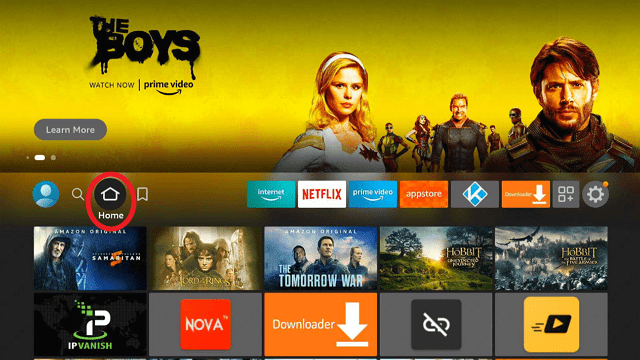
Follow our screenshots below to install the SurfShark VPN app on your Fire TV stick.

1. Go to the Home screen of your Firestick.
step 1 Install Surfshark VPN on Firestick


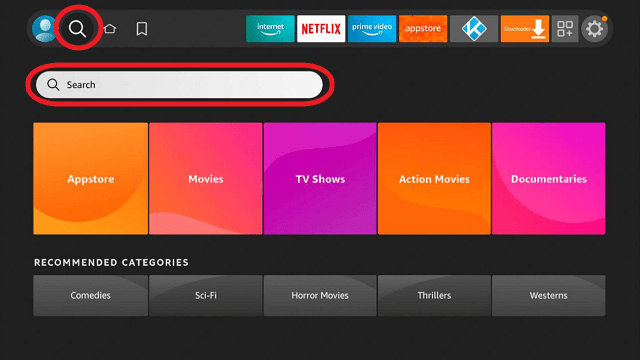
2. Navigate towards the Find tab. Press the Search button from the resulting dropdown.
step 2 Install Surfshark VPN on Firestick


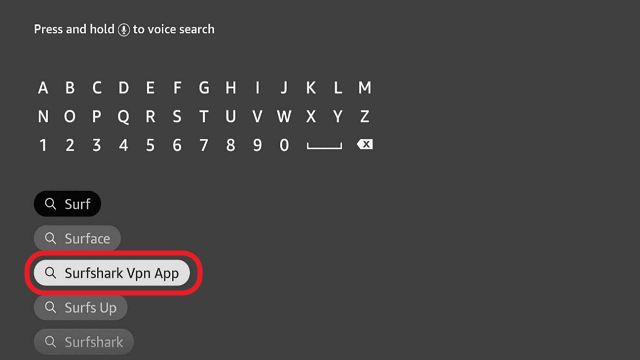
3. Type in the keyword of SurfShark and select from the suggestions that will appear.
step 3 Install Surfshark VPN on Firestick


4. Click the official SurfShark icon from your search results.
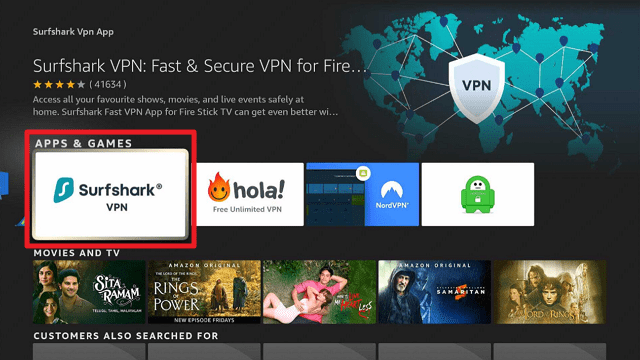
step 4 Install Surfshark VPN on Firestick


5. Press the Download (You own it) button.
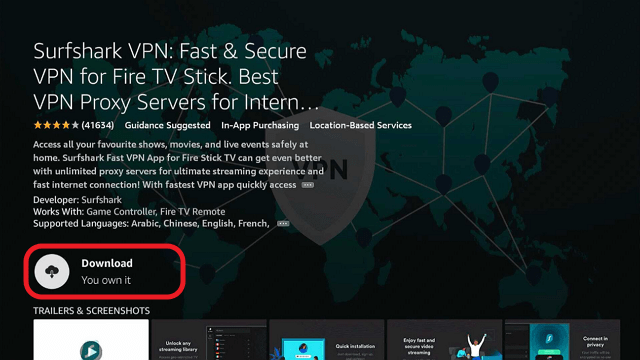
step 5 Install Surfshark VPN on Firestick


6. The SurfShark VPN installer will download on your device.
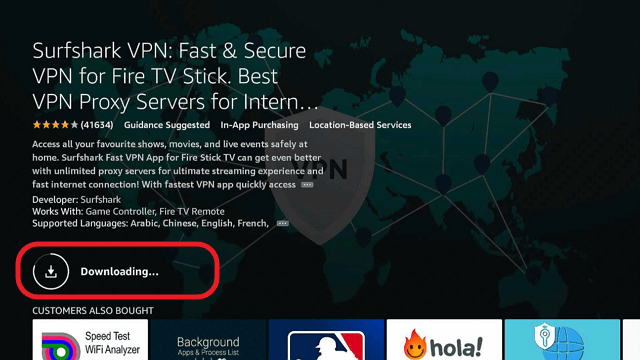
step 6 Install Surfshark VPN on Firestick


7. SurfShark VPN’s app will automatically install itself on your Fire TV stick.
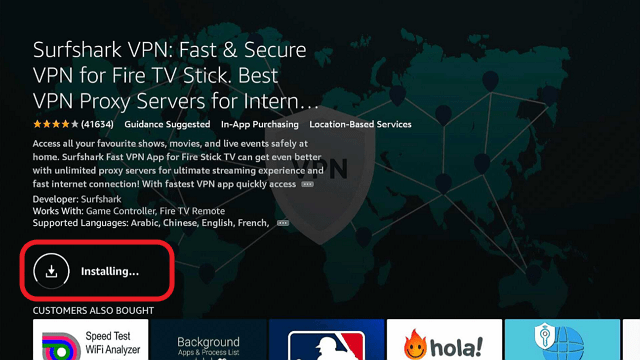
step 7 Install Surfshark VPN on Firestick


8. Press the Open button after completing SurfShark VPN’s installation process.
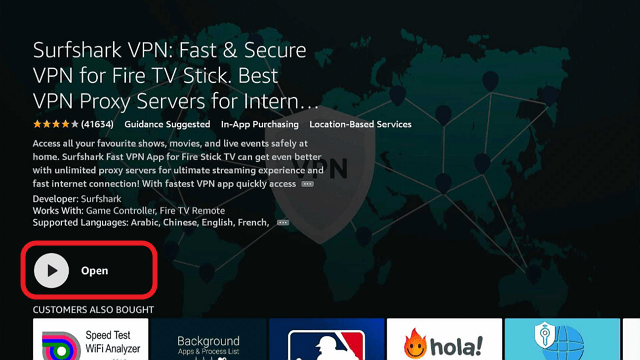
step 8 Install Surfshark VPN on Firestick


9. Please wait for the SurfShark VPN to load its user interface.
step 9 Install Surfshark VPN on Firestick


10. You can now log in with your SurfShark VPN account credentials.
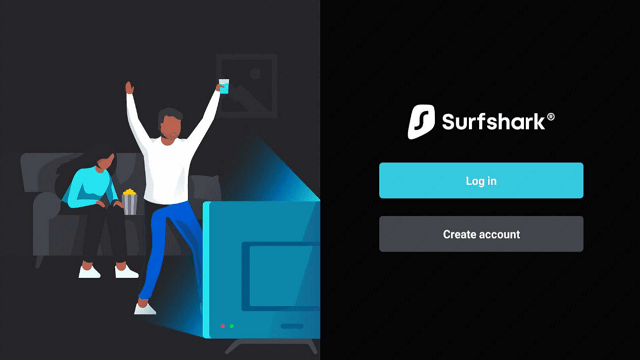
step 10 Install Surfshark VPN on Firestick

Learn more about Surfshark and Grab the Best Surfshark Deal Now!


Install Surfshark on Firestick

Best Surfshark Deal


Other VPNs to Consider

NordVPN (Best for Streaming)

Best Features

  • 5000+ Server in 50+ Countries 
  • Military-Grade Encryption
  • Fast Connection Speed
  • Suitable to a lot of devices
  • No-Log Policy

Prices
  • Complete $5.89 per month (64% Discount)
  • Plus $4.59 per month (56% Discount)
  • Standard $3.69 per month (55% Discount)

Best Features

  • 750+ High-speed VPN Servers in 43 Locations
  • Military-Grade Encryption
  • Fastest HD Streaming and Gaming
  • 30-Day Money-Back Guarantee
  • Unlimited Data & Devices
  • No-Log Policy

Prices
  • 3 Years $1.99 per month (82% Discount)
  • 1 Years $3.29 per month (70% Discount)
  • 1 Month $10.99 per month

IPVanish VPN (Most Secure)

Best Features

  • 1200+ Servers in 60+ Countries around the world
  • Unlimited Connections
  • No-Log Policy
  • Top Notch Military-Grade VPN Protocols and Encryptions
  • 100% Safe and Secured
  • Most Trusted VPN
  • Best VPN for Firestick
  • 30-Day Money-Back Guarantee

Prices
  • Yearly $3.99 per month (63% Discount) – 30 days risk free + Ransomware & Malware Protection
  • Quarterly $5.32 per month (51% Discount)
  • Monthly $10.99 per month


For more VPN discounts, go to ReviewVPN Deals and purchase the best VPN for you.

Click here to get the lowest price on Surfshark through our exclusive limited-time offer.


2